Key Takeaway: Using automated APIs for Amazon listing audits helps identify critical data gaps. It can improve Item Data Quality scores and boost conversion rates by up to 20%.
Key Terms
Amazon Listing Audit: Systematic review of product listings to identify missing data, optimization opportunities, and compliance issues.
IDQ Score: Item Data Quality score (0-100) that Amazon uses to measure listing completeness and quality.
A+ Content: Enhanced Brand Content that allows brand-registered sellers to add rich media to product descriptions.
What Is an Amazon Listing Audit?
An Amazon listing audit reviews your product pages to find missing information and optimization gaps. Think of it as a health check that identifies why some products aren’t converting well.
Image quality and quantity (Amazon allows up to 9 images)
Bullet point completeness
Product descriptions and A+ Content
Backend search terms and attributes
Review health and ratings
Why Listing Quality Matters
Listing quality is a major ranking factor in Amazon’s search algorithm. It’s measured through the Item Data Quality (IDQ) score, which ranges from 0 to 100.
Products need an IDQ score of 90 or above to be included in Amazon’s search algorithm. Higher scores deliver:
Better Search Rankings: Complete listings rank higher in search results.
Suppressed Listings: Amazon hides incomplete listings from search results until they’re fixed.
Key Data Points to Audit
Product Titles
The title should include primary keywords, but still be readable. 200 characters is the maximum for most categories, and special characters are allowed. Be sure to include brand name, key features, and size.
Images and Visual Content
Amazon has specific image requirements. You need:
Main image with white background, product fills 85% of frame
Minimum 1000 x 1000 pixels (2000 x 2000 recommended)
At least five images showing different angles and use cases
Many sellers miss backend attributes that affect IDQ scores:
Complete product attribute data (material, size, target audience)
Search terms using all available character space
Accurate browse node classification
Product identifiers (UPC, EAN, etc.)
Automating Your Audit Process
Manual audits work for small catalogs, but are impossible at scale. You need automated solutions for continuous monitoring when managing hundreds of SKUs.
Using APIs for Audits
The Rainforest API enables systematic, automated Amazon listing audits at scale.
It’s a systematic review of your product listings to identify missing data, optimization opportunities, and compliance issues that impact visibility and conversion rates.
How often should I audit my Amazon listings?
For active sellers, we recommend monthly audits for best-selling products and quarterly reviews for your entire catalog. High-volume sellers benefit from automated daily monitoring.
Can poor listing quality get my products suppressed?
Yes. Amazon suppresses listings missing essential content like titles, main images, or key attributes. They are hidden from search until issues are fixed.
Should I optimize all products or focus on top sellers?
Start with high-traffic, low-conversion listings for the biggest immediate impact. Then optimize best-sellers for incremental gains, and address your full catalog systematically.
Ready to See What Traject Data Can Help You Do?
Stop manual listing audits that miss critical gaps. Our Rainforest API provides comprehensive data for maintaining high-quality Amazon listings at scale.
Traject Data provides enterprise-grade web scraping APIs for ecommerce intelligence, brand protection, and market research. Our solutions help businesses make data-driven decisions with confidence.
In early September 2025, Google quietly removed the num=100 parameter. For years, this setting allowed SEO and data teams to pull the top 100 search results in a single scrape.
Now, that shortcut is gone. Instead of one scrape delivering 100 results, it takes 10 separate scrapes to collect the same data depth. Each scrape carries resource costs — and those costs ripple through to vendors and their customers.
This change has caused a scramble across the industry. Many vendors have already announced new pricing models or higher rates. If you’ve seen a surprise price increase from your current provider, this is why.
In this post, we’ll explain the change, what it means for your monitoring, and how Traject Data has prepared to keep your reporting reliable and your costs predictable.
What Changed: From One Pull to Ten
The removal of the num=100 parameter is a fundamental shift in how SERP data is collected.
Before: One scrape = up to 100 results.
Now: One scrape = 10 results. To get 100 results, you need 10 scrapes.
That means pulling deep SERP data now requires significantly more resources. Vendors who weren’t ready are scrambling to adjust their systems — and their billing.
The Industry Impact: Rising Costs and Surprised Customers
Across the SEO and data industry, providers are reacting in different ways:
Some vendors have introduced per-page pricing, where each page of 10 results is billed separately.
Others are raising rates outright to cover the added scraping overhead.
Customers are reporting service interruptions or billing confusion as providers adapt.
For example, DataForSEO recently announced that their base rate now only covers the first 10 results. Each additional page (10 more results) is billed at 75% of the base rate. For customers who rely on full 100-result SERPs, that can mean paying close to 8× more than before.
The bottom line: if your provider wasn’t prepared, you’re likely feeling the impact already.
How Traject Data Responded: Stability First
At Traject Data, we anticipated this change earlier in the year and built safeguards into our systems. When Google removed the parameter, our customers were able to adjust their queries immediately and continue receiving results. Our systems were already prepared to handle the change.
Here’s what we’ve done:
Pagination already built in: Our APIs automatically handle the new multi-scrape approach.
Core monitoring remains stable: If your focus is on the top 10–20 results, your workflows continue as expected.
Safeguards in place: Because of the new pagination, occasional anomalies like duplicate results are possible. We’ve built logic to minimize this and continue refining it.
By acting early, we ensured customers didn’t wake up without a solution already available to restore their reports and manage costs effectively.
Why Traject Data is Different
Google’s update hit the entire industry, but not every vendor handled it the same way. Here’s how we stand apart:
Proactive, not reactive: We prepared months in advance so customers wouldn’t feel disruption.
Predictable pricing: No surprise hikes. We provide flexible options for deeper SERP coverage when you need it.
Built for scale: Our infrastructure delivers efficiencies that let us pass cost savings on to customers.
Customer-first: Our focus is on keeping your workflows reliable and transparent — no hidden shifts, no sudden surprises.
What This Means for You
If your monitoring needs focus on the top 10–20 results, your reporting is expected to remain consistent with no new costs.
If you need deeper coverage (full SERPs, 50–100 results), we have options to keep your costs predictable and your analysis efficient.
If you’ve recently experienced sudden price increases or unexpected billing changes with another provider, Traject Data offers a smarter, more stable alternative.
Conclusion & Call to Action
Google’s removal of the num=100 parameter has shaken the industry. Many vendors are scrambling to adjust — and passing the cost on to customers.
At Traject Data, we anticipated this shift and acted early. That means our customers have stability, foresight, and predictable pricing, even in the face of industry-wide change.
If you’re frustrated with sudden SERP price hikes, now is the time to explore a better path.
Contact us today to see how Traject Data can keep your monitoring reliable and your costs predictable.
Ready to See What Traject Data Can Help You Do?
We’re your premier partner in web scraping for SERP data. Get started with one of our APIs for free and see the data possibilities that you can start to collect.
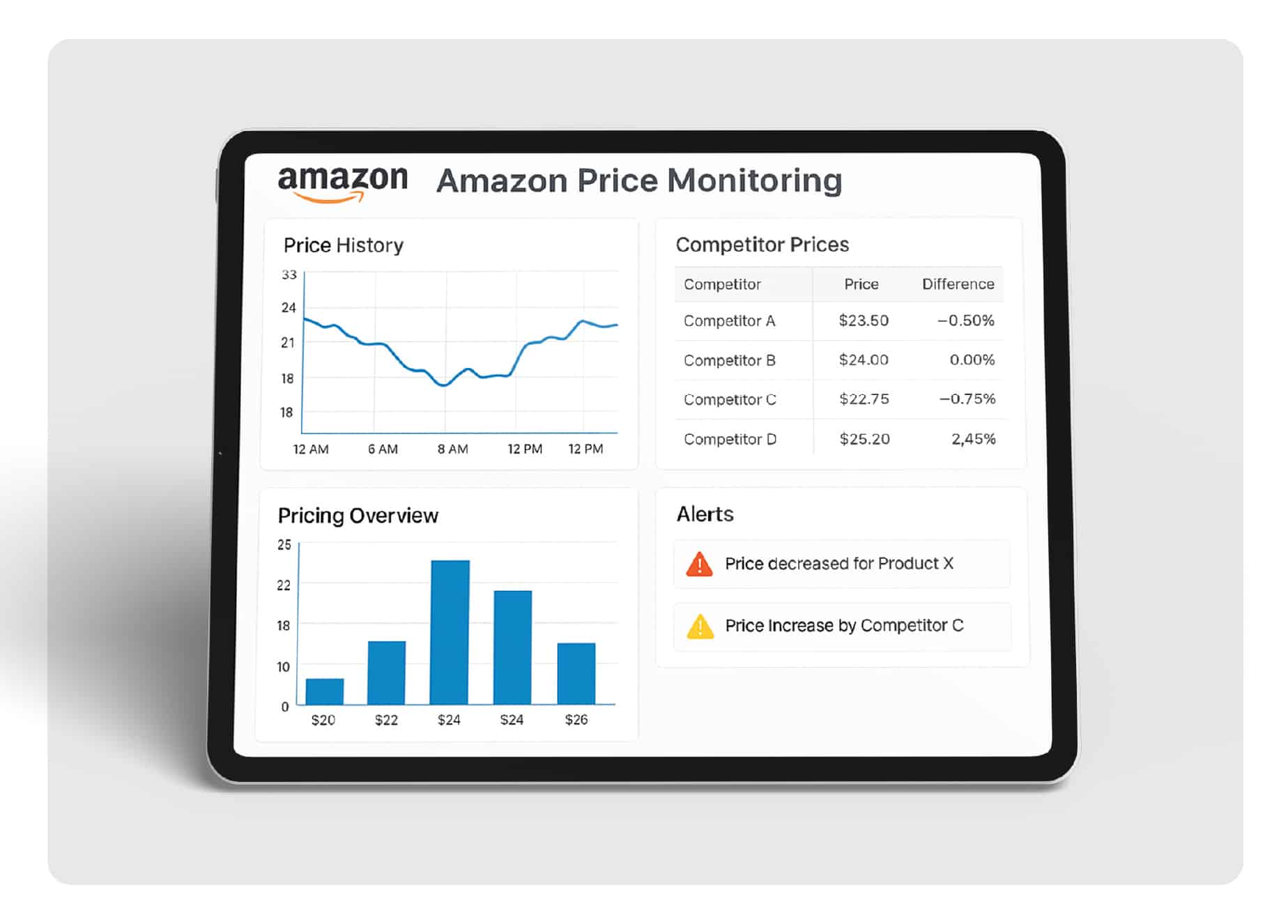
Key Takeaway: Amazon price APIs enable automated competitive monitoring and pricing optimization. By tracking competitor prices in real-time, businesses can increase profits by up to 8% through strategic pricing adjustments while maintaining market competitiveness.
Key Terms:
Amazon Price API: Software interface for accessing Amazon pricing data programmatically
SP-API: Amazon’s Selling Partner API for authorized sellers
Buy Box: Featured placement on Amazon product pages
Price Scraping: Automated data extraction from product pages
Competitive Intelligence: Market insights from competitor analysis
Amazon’s marketplace changes every minute. Prices shift, competitors adjust strategies, and opportunities appear and disappear in real-time. For businesses selling on Amazon, staying competitive requires more than occasional price checks—it demands systematic monitoring through automated systems.
In our tests monitoring thousands of Amazon products, we observed that successful sellers who implement strategic price monitoring can achieve significant competitive advantages. Let’s explore how Amazon price APIs make this possible.
What is an Amazon Price API?
An Amazon price API is a software interface that lets you access pricing data from Amazon’s marketplace automatically. Instead of manually checking product pages, these APIs deliver structured data about prices, availability, and competitor information directly to your systems.
Here’s what happened when we used different pricing approaches:
Manual monitoring: Limited to checking 20-30 products daily
Basic tools: Covered 100-200 products with daily updates
API-powered systems: Monitored 10,000+ products with real-time updates
The difference in competitive response time was dramatic. API-powered monitoring enabled price adjustments within minutes rather than days.
Amazon’s Official Pricing APIs
What is Amazon’s SP-API?
Amazon’s Selling Partner API (SP-API) provides authorized sellers with access to their own pricing data and limited competitor insights. The Product Pricing API helps sellers manage their listings and respond to market changes.
Key features include:
Featured Offer Expected Price (FOEP) data for up to 40 SKUs
However, SP-API has limitations for competitive monitoring. It primarily serves sellers managing their own products rather than providing comprehensive competitor intelligence.
Third-Party Price Monitoring Tools
What are the best Amazon price tracking tools?
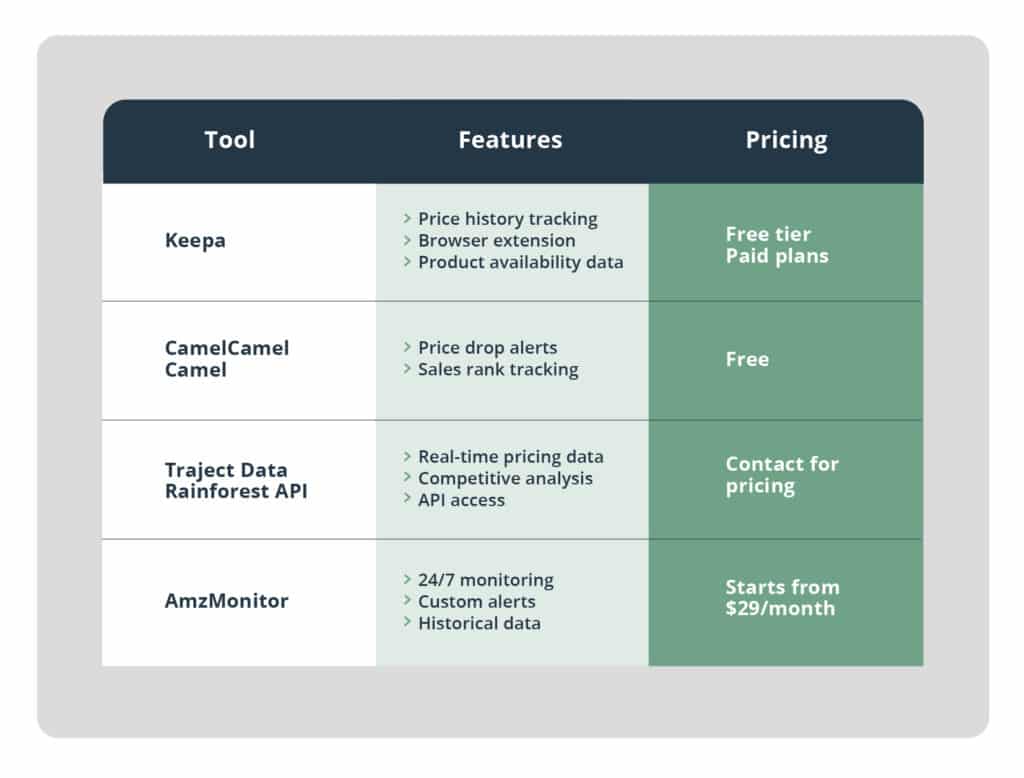
Several specialized tools offer broader monitoring capabilities beyond Amazon’s official APIs:
Popular Consumer Tools
Keepa: Tracks over 5 billion Amazon products worldwide with comprehensive historical data
CamelCamelCamel: Free price history tracking with basic alert features
Honey: Browser extension with price drop notifications
Price API services: Specialized platforms for e-commerce professionals
AmzMonitor: 24/7 tracking for seller-focused monitoring
How do third-party APIs work?
Third-party Amazon price APIs use web scraping technology to gather data that Amazon doesn’t provide through official channels. These services collect:
Real-time pricing from all sellers
Product availability and stock levels
Review counts and ratings
Search ranking positions
Promotional pricing and deals
In our experience implementing these solutions, third-party APIs provide more comprehensive competitive intelligence than Amazon’s official offerings. They enable monitoring of any product on Amazon, not just your own listings.
Amazon Price API Free Options
What free Amazon price API options exist?
While Amazon’s official SP-API isn’t technically free, new AWS customers get significant credits. Here are your free options:
Amazon SP-API Free Tier:
Up to $200 in AWS credits for new customers (starting July 2025)
One million API calls per month for 12 months
Access to official pricing data for your own products
Third-Party Free Trials:
Most enterprise solutions offer free trials or demo access
Buy Box optimization: Data-driven pricing increases featured placement chances
What pricing strategies work best?
Successful Amazon sellers implement these proven approaches:
Dynamic Repricing
Automated price adjustments based on competitor changes and market conditions. Amazon’s automation guidelines recommend real-time responses to pricing events.
MAP Enforcement
Minimum Advertised Price monitoring protects brand value and maintains channel relationships. Businesses using effective MAP monitoring achieve up to 12% quarterly revenue increases by preventing price erosion.
Competitive Intelligence
Understanding competitor strategies through comprehensive data analysis. This includes monitoring:
Price change patterns
Promotional strategies
Stock availability
Market positioning
For deeper insights into competitive strategies, explore our blog articles on pricing optimization.
Frequently Asked Questions
What is an Amazon price API?
An Amazon price API is a software interface that allows you to programmatically access and monitor pricing data from Amazon’s marketplace. It enables automated price tracking, competitor monitoring, and real-time pricing updates without manual intervention.
How often should I monitor competitor prices on Amazon?
For competitive markets, monitor prices multiple times daily or even hourly. Real-time monitoring helps you respond quickly to price changes and maintain competitive positioning. Less competitive products may only need daily or weekly monitoring.
Can I use Amazon’s official API for price monitoring?
Amazon’s SP-API provides pricing data for authorized sellers managing their own products. For broader competitor monitoring across any Amazon products, third-party solutions like Traject Data’s Rainforest API offer more comprehensive coverage and flexibility.
What types of product data can I access through APIs?
Amazon product APIs provide access to comprehensive data including product titles, descriptions, pricing, availability, customer reviews, ratings, seller information, images, specifications, category data, and sales rankings. The specific data available depends on the API provider and access level.
How fast can I get Amazon product data through APIs?
Real-time APIs typically respond within 1-5 seconds, providing current product information. Batch APIs may have longer processing times but can handle larger data volumes efficiently. Response times depend on the complexity of requests and API provider infrastructure.
Do I need technical expertise to implement Amazon product APIs?
Basic programming knowledge helps, but many API providers offer user-friendly interfaces, documentation, and support. Some solutions provide no-code options or managed services. The complexity depends on your specific integration requirements and chosen solution.
Ready to See What Traject Data Can Help You Do?
We’re your premier partner in web scraping for eCommerce data. Get started with one of our APIs for free and see the data possibilities that you can start to collect.
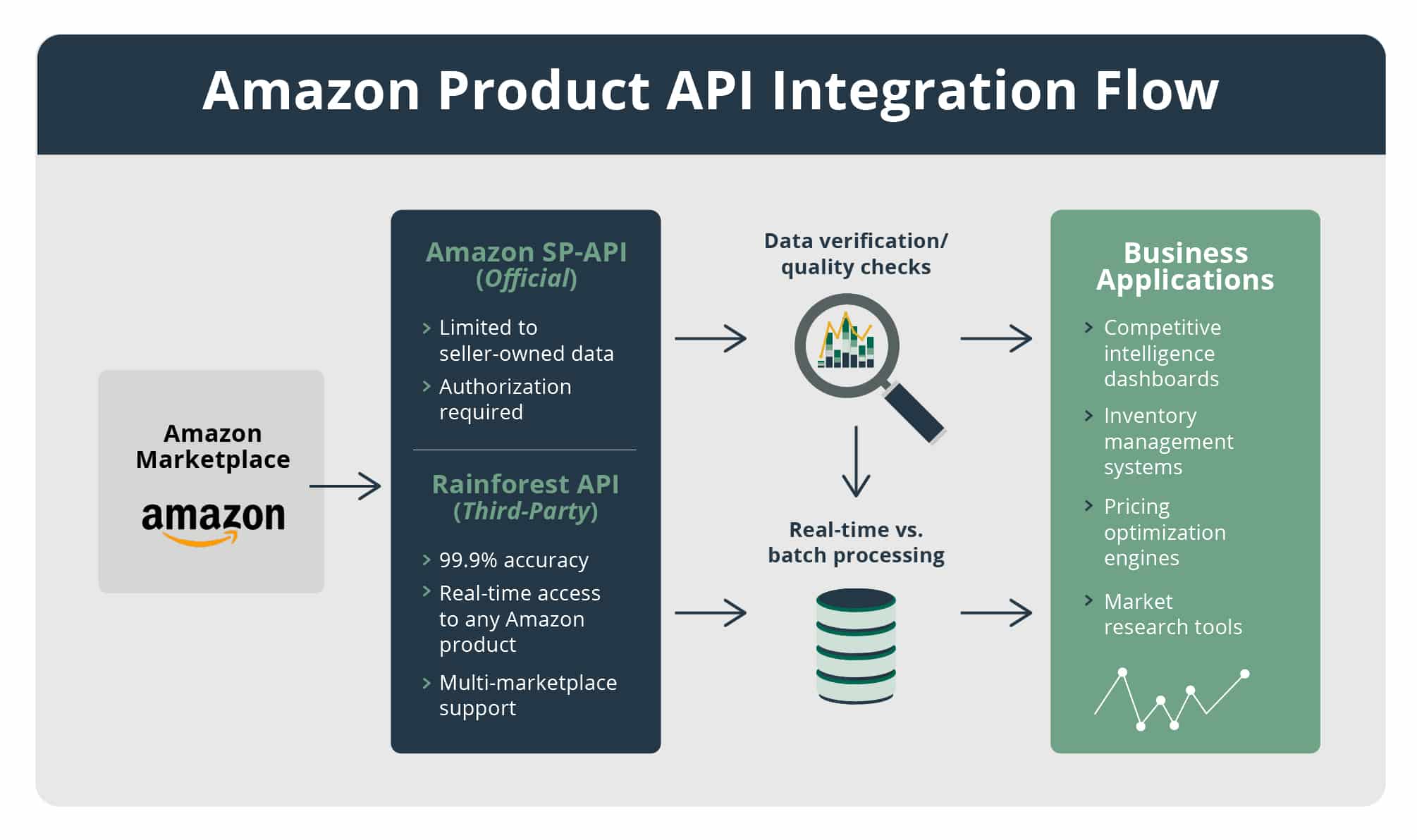
Key Takeaway: Amazon product APIs provide programmatic access to product data including titles, prices, reviews, and inventory information. Over one million Amazon sellers use API-powered applications to automate their businesses, with enterprise solutions delivering 99.9%+ accuracy for mission-critical applications.
Key Terms:
Amazon Product API: Software interface for accessing Amazon product information programmatically
SP-API: Amazon’s Selling Partner API for authorized sellers
ASIN: Amazon Standard Identification Number for products
Real-Time Data: Information updated within seconds or minutes of changes
Product Catalog API: Access to Amazon’s complete product database
JSON Format: Structured data format for easy integration
Amazon’s marketplace contains over 350 million products, with data changing constantly. Manually tracking this information is impossible at scale, which is why businesses turn to Amazon product APIs for automated data access. These APIs provide structured, real-time access to product information that powers everything from competitive intelligence to inventory management.
In our tests integrating various Amazon product APIs, we found significant differences in data accuracy, update frequency, and coverage. Over one million Amazon sellers worldwide use API-powered applications to automate their operations, demonstrating the critical role these tools play in modern e-commerce.
What is an Amazon Product API?
An Amazon product API is a software interface that allows developers to programmatically retrieve product information from Amazon’s marketplace. Instead of manually browsing product pages, APIs deliver structured data directly to your applications.
Amazon product APIs typically provide access to:
Product titles, descriptions, and specifications
Pricing information and availability status
Customer reviews and ratings
Product images and media assets
Seller information and fulfillment details
Sales ranking and bestseller data
The primary advantage of using APIs over manual data collection is speed and scale. Where manual checking might cover 10-20 products daily, API-powered systems can monitor thousands of products simultaneously with real-time updates.
Why do businesses need Amazon product data?
Access to comprehensive product data enables several business-critical use cases:
Competitive Intelligence: Monitor competitor products, pricing, and market positioning
Inventory Management: Track stock levels and availability across products
Price Optimization: Implement dynamic pricing based on market conditions
Content Strategy: Analyze successful product descriptions and optimize listings
Market Research: Identify trending products and emerging categories
For detailed guidance on implementing these strategies, check our blog articles on e-commerce automation.
Retrieve information about items in Amazon’s catalog, including product details, attributes, and classifications:
Search by ASIN or keywords
Product identifiers and dimensions
Browse classifications
Sales rankings
Listings Items API
Access and manage your own product listings, including pricing and inventory updates:
Retrieve listing details
Update product information
Manage inventory levels
JSON schema validation
Product Pricing API
Featured Offer Expected Price (FOEP)
Competitive price thresholds
Buy Box pricing data
Real-time price updates
What are the limitations of Amazon’s official APIs?
While powerful for sellers managing their own products, Amazon’s official APIs have constraints for broader market intelligence:
Seller Authorization Required: Access limited to your own products
Restricted Competitive Data: Limited visibility into competitor information
Rate Limiting: Request quotas may restrict large-scale monitoring
Complex Authentication: Requires application approval and ongoing compliance
For comprehensive competitive intelligence and market research, businesses often require additional solutions beyond Amazon’s official offerings. Our case studies show how enterprises overcome these limitations.
Third-Party API Solutions
How do third-party Amazon product APIs work?
Third-party APIs use web scraping technology to access publicly available Amazon product data. These services provide broader coverage than official APIs, enabling monitoring of any Amazon product regardless of ownership.
When evaluating third-party Amazon product APIs, consider these factors:
Data Accuracy: Look for providers with verification systems and quality assurance
Update Frequency: Ensure real-time or near real-time data refresh
Coverage Scope: Verify support for required Amazon marketplaces
Integration Options: Confirm compatibility with your technical infrastructure
Reliability: Check uptime guarantees and service level agreements
For technical implementation details, review our comprehensive documentation.
Amazon Product Search API Examples
How do Amazon product search APIs work?
Amazon product search APIs allow you to query Amazon’s catalog using keywords, categories, or product identifiers. Here’s a real example of how these systems work:
Custom Features: Specialized data processing or delivery
Support Level: Technical assistance and SLA guarantees
For detailed pricing information tailored to your needs, check our frequently asked questions about API costs.
Real-Time vs. Batch Data
Why is real-time data important for Amazon products?
Amazon’s dynamic marketplace requires current information for effective decision-making. Real-time Amazon data APIs source information directly from Amazon with response times between 1-5 seconds, ensuring you have the most current information available.
Real-time data provides critical advantages:
Competitive Response: React immediately to competitor price changes
Inventory Alerts: Know instantly when products go out of stock
Deal Monitoring: Catch lightning deals and limited-time offers
Buy Box Changes: Monitor when featured seller positions shift
When is batch data sufficient?
For certain use cases, periodic batch updates may meet requirements while reducing costs:
Historical analysis and trend identification
Content optimization and SEO research
Market research and category analysis
Long-term competitive intelligence
The choice between real-time and batch data depends on your specific business needs and response time requirements.
Implementation Guide with Code Examples
How do you get started with Amazon product APIs?
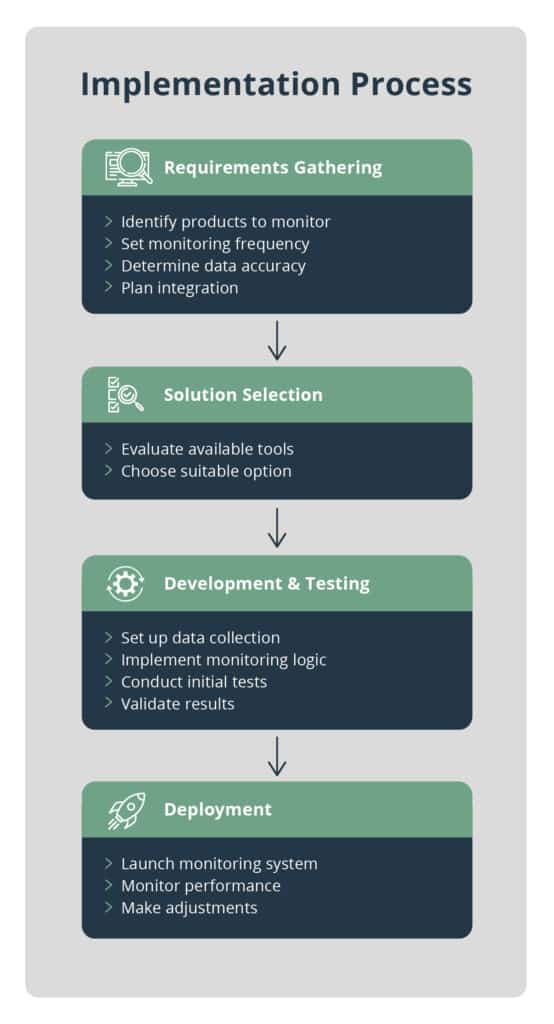
Follow these steps to implement Amazon product data collection:
Define Requirements: Identify what product data you need and update frequency
Choose Your Solution: Select between official APIs for your own products or third-party solutions for broader coverage
Plan Integration: Design how data will flow into your existing systems
Test Implementation: Start with a small dataset to verify accuracy and performance
Scale Gradually: Increase volume and frequency based on initial results
What does a complete API integration look like?
Here’s a practical example using third-party APIs for comprehensive product monitoring:
Based on our experience helping businesses implement Amazon product APIs, common challenges include:
Data Quality Validation: Ensuring accuracy and consistency of retrieved information
Rate Limit Management: Optimizing request patterns to avoid throttling
Error Handling: Building robust systems to handle API failures gracefully
Data Storage: Designing efficient storage for large volumes of product data
For guidance on overcoming these challenges, explore our case studies featuring successful API implementations.
Frequently Asked Questions
What is an Amazon product API?
An Amazon product API is a software interface that allows developers to programmatically access Amazon product data including titles, descriptions, prices, reviews, availability, and seller information in real-time. It eliminates the need for manual data collection by providing structured access to Amazon’s product database.
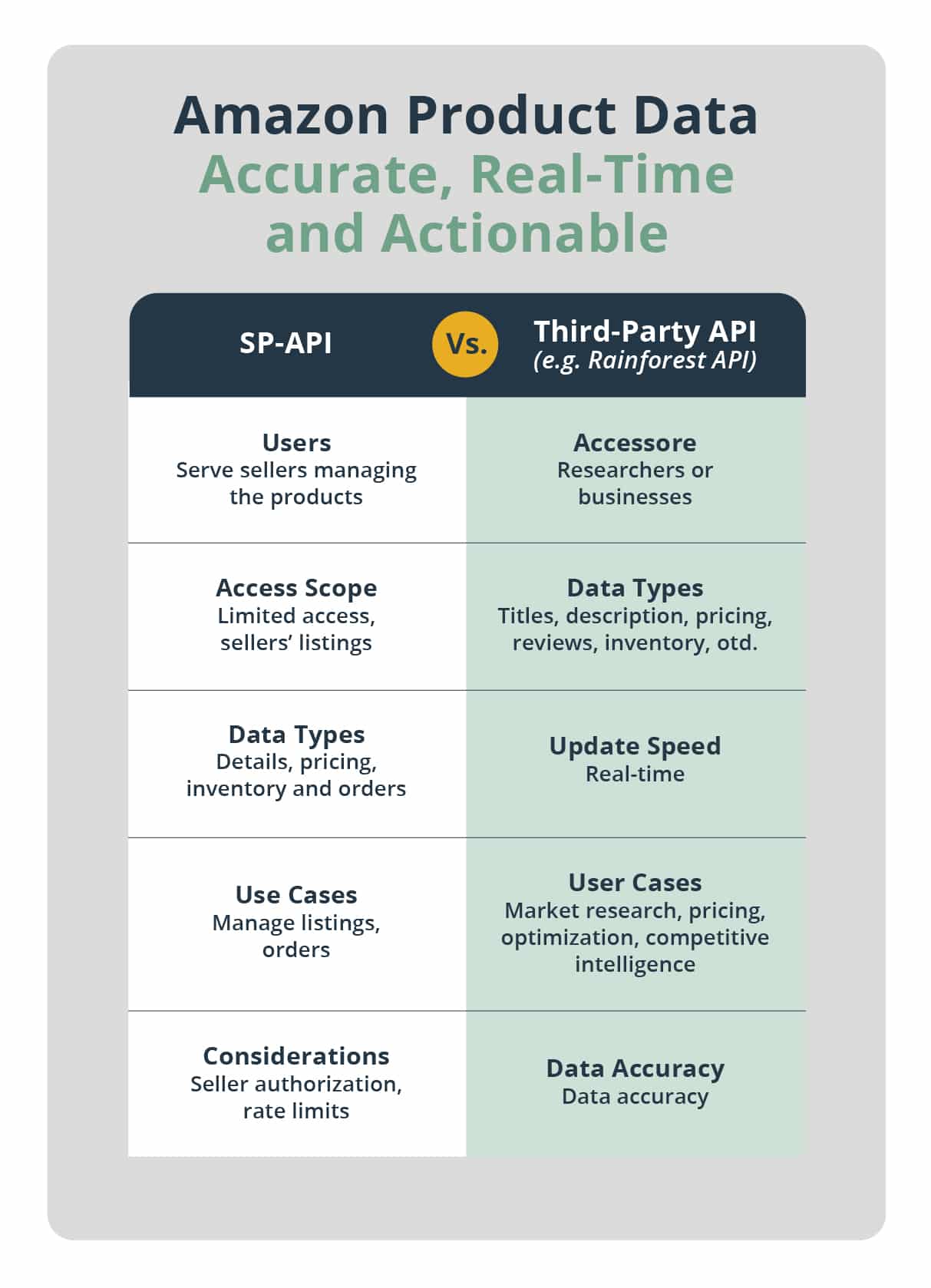
What’s the difference between Amazon’s official APIs and third-party solutions?
Amazon’s official APIs like SP-API serve sellers managing their own products with authorized access to specific data. Third-party APIs provide broader access to any Amazon product data for competitive intelligence and market research, without requiring seller authorization or product ownership.
How accurate is Amazon product API data?
Data accuracy varies by provider. Official Amazon APIs provide highly accurate data for authorized products. Quality third-party providers like Traject Data’s Rainforest API deliver over 99.9% accuracy through automated quality assurance systems and real-time data verification.
What types of product data can I access through APIs?
Amazon product APIs provide access to comprehensive data including product titles, descriptions, pricing, availability, customer reviews, ratings, seller information, images, specifications, category data, and sales rankings. The specific data available depends on the API provider and access level.
How fast can I get Amazon product data through APIs?
Real-time APIs typically respond within 1-5 seconds, providing current product information. Batch APIs may have longer processing times but can handle larger data volumes efficiently. Response times depend on the complexity of requests and API provider infrastructure.
Do I need technical expertise to implement Amazon product APIs?
Basic programming knowledge helps, but many API providers offer user-friendly interfaces, documentation, and support. Some solutions provide no-code options or managed services. The complexity depends on your specific integration requirements and chosen solution.
Ready to See What Traject Data Can Help You Do?
We’re your premier partner in web scraping for eCommerce data. Get started with one of our APIs for free and see the data possibilities that you can start to collect.
Tariffs. They dominate headlines and introduce uncertainty across industries. For businesses that import, export, manufacture, or rely on global supply chains, changing tariff policies can bring serious financial and operational challenges.
That’s where web scraping for tariffs comes in. By extracting real-time data from the web, businesses can monitor market trends, competitor pricing, and regulatory changes—empowering faster, smarter decisions. When paired with a SERP API, web scraping becomes even more powerful, automating the collection of search engine data for fast, scalable insights.
Why Use Web Scraping for Tariffs?
Web scraping helps businesses gather actionable data from critical online sources, including:
With this data, companies can track how tariffs are impacting product pricing, supply chains, and competitor behavior. Whether you’re adjusting sourcing strategies or setting new price points, scraping relevant data helps reduce risk and improve agility.
In today’s volatile trade environment, staying informed is no longer optional—it’s essential.
How a SERP API Supports Tariff Intelligence
A Search Engine Results Page (SERP) API enables businesses to automatically collect Google search results in real time. Traject Data’s Scale SERP API makes it easy to extract structured information from SERPs—including organic listings, “People Also Ask” questions, featured snippets, and even AI Overviews.
For companies navigating tariffs, a SERP API offers several key benefits:
1. Real-Time Monitoring of Tariff News and Policy Changes
Automated tracking: Continuously query Google for phrases like “2025 U.S. steel tariffs” or “China trade agreement updates.”
Custom alerts: Set up notifications when new laws, trade agreements, or tariff rate changes hit the news.
2. Competitor and Market Analysis
Competitor pricing: Scrape product listings to understand how competitors are adjusting their prices in response to new tariffs.
Market trends: Identify changes in product offerings, logistics routes, or sourcing strategies driven by tariff policy.
3. Supply Chain Risk Intelligence
Supplier monitoring: Track updates about suppliers in high-tariff regions—such as delays, route changes, or closures.
Vendor risk assessment: Use SERP data to evaluate third-party vendors’ stability and compliance amid trade policy shifts.
4. SEO and Reputation Management
SEO optimization: Target tariff-related search queries to ensure your content ranks as decision-makers look for solutions.
Reputation monitoring: Stay ahead of how your brand is being discussed in the context of global trade.
A Valuable Public Resource: USITC DataWeb
If you’re researching the Harmonized Tariff Schedule (HTS) of the United States, the U.S. International Trade Commission (USITC) DataWeb is a helpful resource. It provides public access to:
Import duty rates by product category
Annual updates to U.S. tariff policy
Trade agreements with preferential or zero tariffs
While DataWeb is useful for static analysis, it doesn’t provide the real-time visibility needed to respond quickly to shifting conditions. That’s where dynamic tools like SERP APIs and ecommerce APIs come in.
How Ecommerce APIs Help with Tariff Intelligence
In addition to scraping search engine results, ecommerce APIs provide critical pricing and inventory data that reflects real-world reactions to tariffs.
Traject Data offers ecommerce APIs for Amazon, Walmart, and Target—three of the largest online retailers and key bellwethers for consumer pricing trends. By monitoring how these platforms adjust to tariffs, businesses can:
Track real-time price fluctuations by product category
Understand shifts in inventory availability
Benchmark against major retailers’ pricing strategies
Together with a SERP API, ecommerce APIs give you a comprehensive view of how tariffs are impacting both perception and performance in the market.
Start Web Scraping for Tariffs Today
With the right tools and strategy, web scraping for tariffs can give your business a clear edge in an unpredictable market. Traject Data’s Scale SERP APIis designed to help you stay ahead of change by delivering real-time insights from the world’s most important search engine.
Whether you’re tracking competitor pricing, monitoring policy shifts, or optimizing your SEO, our SERP API and ecommerce data products provide the intelligence you need to act quickly and confidently.
→ Ready to future-proof your tariff strategy? Contact Traject Data to get started.
Ready to See What Traject Data Can Help You Do?
We’re your premier partner in web scraping for SERP data. Get started with one of our APIs for free and see the data possibilities that you can start to collect.
A SERP API is a powerful tool for web scraping — especially when it comes to collecting real-time data from search engine results pages (SERPs). In the world of finance, where timing, sentiment, and consumer behavior can drive major decisions, the ability to extract this kind of information at scale is a game-changer.
In this post, we’ll explore how web scraping for finance using a SERP API can give you an edge — whether you’re in retail banking, hedge funds, private equity, or market research. We’ll also show how Traject Data’s Scale SERP API enables powerful, real-time insights from financial search behavior.
What Is Web Scraping for Finance with a SERP API?
Web scraping for finance involves extracting publicly available data from the web to support financial research, forecasting, and decision-making. A SERP API lets you tap into real-time search trends, product listings, prices, and more — directly from search engines like Google — without building a crawler yourself.
When powered by a scalable tool like Traject Data’s Scale SERP API, you can go beyond surface-level search results and access raw, structured data to uncover emerging trends, model investor sentiment, track competitive movements, and more.
Below is a list of use cases for web scraping for finance with a SERP API, showing how financial professionals can apply real-time search data to stay ahead.
Use Case 1: Personal Finance Turbulence: Tracking Consumer Needs via Search
With economic volatility — inflation, interest rate changes, or student loan restarts — consumer search behavior shifts rapidly. People are Googling things like “how to budget for inflation,” “best high-yield savings account,” or “debt consolidation tips.”
For banks and fintech companies, this search data is a goldmine. If you’re not paying attention, you’ll miss key signals of shifting customer needs — and your competitors won’t.
How a SERP API Helps
Traject Data’s SERP API transforms this search behavior into actionable insight. Marketing and product teams can instantly detect spikes in demand for financial products or advice. You can:
Spot trending topics like “mortgage refinance options” or “credit repair services”
React quickly with targeted campaigns, content, or product adjustments
Monitor thousands of keywords — not just a handful
Slice the data by region, time, or category
With raw SERP data, you gain a comprehensive, real-time view of consumer intent — helping you respond faster than your competition.
Use Case 2: Market Sentiment Radar: Investor Insights from Search Trends
Markets move on emotion. But traditional sentiment tools often lag. Investors, however, turn to Google the moment uncertainty strikes — searching things like “is a market crash coming” or “safe investments during a downturn.”
Studies show that search volume spikes for certain finance terms often precede short-term market moves.
How a SERP API Helps
With Traject Data, analysts and quants can tap into millions of real-time finance-related searches. Feed this data into sentiment models or dashboards to:
Track surging interest in terms like “bond default risk” or “rate cut probability”
Monitor changes in investor attention across asset classes
Combine search data with market indicators for improved forecasting
Use Case 3: Hedge Funds: Forecasting Inflation by Sector
Inflation hits different sectors differently. Energy, consumer goods, and services all react at different speeds — and waiting for official CPI reports is often too late.
How a SERP API Helps
Traject Data’s product pricing and marketplace listings provide early signals of inflationary pressure. By tracking how product prices shift online, macro hedge funds can:
Detect sector-specific inflation early
Adjust portfolios before CPI data is published
Gain a competitive edge in risk management and strategy
Use Case 4: Private Equity: Validating Exposure to Tariff Risk
Tariffs can dramatically impact supply chains and product sourcing — and ultimately, your portfolio companies. When suppliers shift from one region to another, price and brand availability often shift in the SERPs.
How a SERP API Helps
Traject Data helps you monitor:
Changes in seller origins (e.g., a rise in Korean brands over Chinese brands)
Competitor pricing adjustments tied to tariffs
Shifts in search visibility due to geopolitical or trade policy changes
This level of insight enables private equity firms to spot risks early and make informed, proactive decisions.
Use Case 5: Equity Analysts: Monitoring Retail or Manufacturing Dynamics
Earnings surprises are often foreshadowed by real-world signals like inventory issues or price hikes. But these signals rarely show up in traditional financial statements until it’s too late.
How a SERP API Helps
With daily tracking of product listings and prices, Traject Data empowers analysts to:
Identify rising prices before they show up in P&L statements
Spot inventory shortages or markdowns
Monitor competitive shifts in real time
This data helps you ask sharper questions during earnings calls — and get ahead of consensus.
Use Case 6: Global Macro: Watching Emerging Markets and Trade Patterns
Global strategists need to track trade flows, import-heavy categories, and supply chain shifts — especially in emerging markets where public data may be scarce or lagging.
How a SERP API Helps
Traject Data enables you to:
Track import-heavy product categories in U.S. search data
Identify regional shifts (e.g., increased sourcing from Vietnam over China)
Detect early signals of macroeconomic changes via trade behavior
By layering SERP insights over market data, you can forecast large-scale economic trends across Asia, Latin America, and beyond.
Ready to Get Started?
Whether you’re a bank, hedge fund, private equity firm, or analyst, web scraping for finance with a SERP API gives you the edge to see what’s coming before it hits the headlines.Traject Data’s Scale SERP API delivers real-time, raw SERP data at scale — so you can monitor financial trends, investor sentiment, product pricing, and supply chain shifts as they unfold. Learn more about Traject Data’s Scale SERP API and start building smarter financial models today.
Ready to See What Traject Data Can Help You Do?
We’re your premier partner in web scraping for SERP data. Get started with one of our APIs for free and see the data possibilities that you can start to collect.
Google’s “People Also Ask” (PAA) feature is a powerful addition to modern SERPs (Search Engine Results Pages). It presents a list of related questions that help users dig deeper into their original query. For marketers, SEOs, and researchers, this section is a goldmine for keyword research, content strategy, and understanding user intent.
But how do you extract this data at scale?
In this post, we’ll show you exactly how to scrape Google People Also Ask with a SERP API, using Traject Data’s SerpWow API.
What Is the “People Also Ask” Section in Google Search Results?
The People Also Ask (PAA) box is an interactive module that appears on many Google results pages. It displays a set of frequently asked questions related to the original query. When you click on a question, it expands to reveal a short answer—usually pulled from a high-ranking page—and often triggers additional related questions to appear.
This dynamic, self-expanding list gives Google users a quick way to explore connected ideas and refine their search.
Why Is “People Also Ask” Valuable?
For digital marketers, SEOs, and content creators, the People Also Ask box is more than a curiosity—it’s a strategic advantage. Here’s why:
Benefit
How “People Also Ask” Helps
Reveals user intent
Shows the exact questions real users are asking
Uncovers new keywords
Surfaces long-tail and semantically related keyword opportunities
Improves content structure
Offers natural subheadings and FAQ ideas
Monitors trends
Highlights emerging questions and shifting user interests
Saves research time
Quickly uncovers relevant questions without manual digging
Supports user-first content
Helps tailor content to address actual pain points and curiosity
How to Access the People Also Ask Box
If you want to inspect the People Also Ask box manually:
Search on Google: Enter your keyword or query.
Find the PAA Box: It often appears after the first few organic results, though placement varies.
Expand the Questions: Click any question to see the answer and generate new related questions.
Google generates the People Also Ask (PAA) section of the search results page by analyzing the user’s own history, and the patterns of other users who’ve explored similar topics. Your location and time also factor into the algorithm which means the results can vary across users, location, and time.
How to Scrape Google People Also Ask with a SERP API
To automate your research and gather PAA data programmatically, a SERP API is the best solution. Here’s how to scrape Google People Also Ask using SerpWow by Traject Data.
Step 1: Sign Up for an API Key
Head to Traject Data and sign up for SerpWow access. You’ll receive a secure API key for authentication.
Step 2: Review the Documentation
Visit the SerpWow API documentation to explore the available endpoints, request parameters, and JSON structure. You’ll find examples for web results, AI Overviews, local listings, and more.
Step 3: Make a Search Request
When you run a query using SerpWow, the response will include a related_questions property. This returns an array of PAA data, including:
The question text
The answer snippet
A link to the source page
Example:
{
  "related_questions": [
    {
      "question": "What is a SERP API?",
      "answer": "A SERP API lets you access real-time search engine results programmatically...",
      "link": "https://example.com/what-is-a-serp-api"
    },
    ...
  ]
}
Bonus: People Also Search For
SerpWow also supports scraping data from the People Also Search For (PASF) section. This shows up when a user clicks on a result and then returns to the SERP. The API includes this data under the people_also_search_for property—useful for exploring brand associations and related entities.
Why Use Traject Data’s SerpWow for PAA Scraping?
Whether you’re tracking SERP volatility, researching SEO content gaps, or analyzing AI-generated answers over time, SerpWow gives you clean, structured, and scalable access to the People Also Ask section—without the hassle of browser automation or IP rotation.
Full support for PAA, PASF, AI Overviews and other SERP modules
Ready to Scrape Google People Also Ask?
Traject Data’s SerpWow API makes it easy to tap into Google’s “People Also Ask” insights at scale. Whether you’re optimizing content, tracking brand visibility, or studying question trends, SerpWow delivers reliable data you can build on.
We’re your premier partner in web scraping for SERP data. Get started with one of our APIs for free and see the data possibilities that you can start to collect.
AI is transforming the tech landscape at a record pace. Nowhere is this shift more apparent than in search. At Google I/O 2025, the biggest update was clear: AI Overviews are now front and center in Google’s search experience. Ads are integrated directly into AI-generated answers, raising new questions about visibility, attribution, and the future of SEO.
Some are calling it the death of SEO as we know it. Whether or not that’s true, one thing is certain: tracking and analyzing Google AI Overviews is now essential.
In this post, we’ll walk through exactly how to scrape Google AI Overviews with a SERP API, using Traject Data’s Scale SERP API—SerpWow—as your go-to tool.
What Can You Scrape from Google?
Scraping Google isn’t limited to standard search results. A robust Google SERP API like Traject Data’s SerpWow gives you structured access to a wide range of search elements, including:
Whether you’re focused on ecommerce, local SEO, competitive intelligence, or organic rankings, SerpWow delivers clean, reliable data that’s ready to use.
Why Use a SERP API to Scrape AI Overviews?
Google regularly rolls out new anti-scraping defenses that block manual scripts. That makes scraping AI Overviews manually—especially across different locations and devices—slow, error-prone, and expensive.
Coverage: Access AI Overviews across devices, locations, and languages.
AI Overviews, in particular, are constantly evolving, making automated, structured access through an API the only practical way to monitor this feature at scale.
How to Scrape Google AI Overviews with SerpWow
Getting started is simple. Here’s a step-by-step guide:
1. Sign Up for an API Key
Head to Traject Data and sign up for access to SerpWow. You’ll receive a unique API key to authenticate your requests.
2. Review the Documentation
Visit the SerpWow API docs to explore available endpoints and parameters. You’ll find working examples for AI Overviews, product data, reviews, local listings, and more.
3. Make Your First API Request
Scrape Google AI Overviews with the Right Parameters
To retrieve AI Overviews, include the following parameters in your API request:
engine=google
include_ai_overview=true
device=mobile
location=United States
SerpWow supports 200+ Google domains and 40+ languages, making it easy to:
Track AI Overviews on google.com, google.co.uk, google.fr, and more
Analyze SERPs across desktop and mobile globally
Match query language to domain locale for accurate results
Note: Your q parameter must match the language of the Google domain (e.g., French for google.fr) to return AI Overview content.
Ready to Scrape Google AI Overviews?
Whether you’re monitoring brand visibility, tracking competitive content, or studying how AI-generated answers evolve, Traject Data’s SerpWow API gives you the tools you need.
We’re your premier partner in web scraping for SERP data. Get started with one of our APIs for free and see the data possibilities that you can start to collect.
If you’re working with Amazon product data—whether for ecommerce analytics, price tracking, or product research—you’ve likely run into the need to collect Amazon ASINs at scale. In this post, we’ll show you how to scrape Amazon ASIN numbers quickly and reliably using an ASIN lookup API designed for performance and scale. Let’s dive in.
What Is an Amazon ASIN?
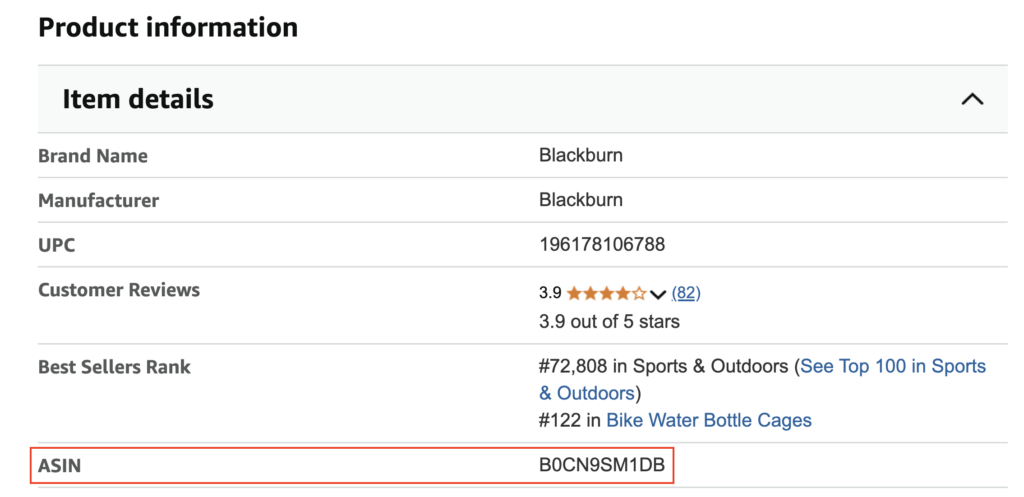
The Amazon Standard Identification Number (ASIN) is a unique 10-character alphanumeric code used by Amazon to identify products in its marketplace.
Here are a few key facts about ASINs:
Amazon’s internal ID system: ASINs help Amazon track and organize millions of products.
Not globally standardized: Unlike UPCs or EANs, ASINs only exist within Amazon’s ecosystem.
Books are different: For books, the ASIN is typically the same as the ISBN.
Regional differences: A single product may have different ASINs across marketplaces like Amazon.com, Amazon.ca, or Amazon.co.uk.
Where to Find an Amazon ASIN (Manually)
If you only need one or two ASINs, manual lookup is fine:
Check the product detail page under “Product Information”
Look in the URL, typically found after /dp/
But if you need to find hundreds or thousands of ASINs—especially based on barcodes or product identifiers—manual methods won’t cut it. That’s where an ASIN lookup API becomes essential.
Why Scraping Amazon ASINs Is Hard (Without an API)
Ever-changing HTML structures: Amazon’s dynamic layout and A/B testing can easily break DIY scrapers.
Anti-scraping defenses: CAPTCHAs, IP blocking, and rate limits make automated scraping unreliable.
Compliance issues: Understanding Amazon’s terms of service is crucial.
Time and cost of maintenance: Scrapers require constant updates and monitoring.
Data cleanup: Raw scraped data often needs validation and filtering before it’s usable.
Instead of building your own solution, you can use a specialized ASIN lookup API like Traject Data’s Rainforest API, which handles all the heavy lifting.
How to Use Rainforest API for ASIN Lookup
The Rainforest API makes it easy to scrape Amazon ASINs by converting barcodes (GTINs, UPCs, EANs, or ISBNs) into ASINs automatically. This makes it one of the most effective ASIN lookup APIs on the market.
How ASIN Lookup Works with Rainforest API
Settype=product
Add the gtin parameter (e.g., a UPC, ISBN, or EAN)
Specify the correct Amazon domain using amazon_domain
Rainforest will look up the GTIN on the Amazon site you specify, convert it into an ASIN, and return complete product data.
Whether you’re managing a product catalog, tracking marketplace trends, or building an ecommerce app, the Rainforest API is the ASIN lookup API built to save you time and effort.
Start Scraping Amazon ASINs Today
Looking for a fast, reliable way to scrape ASINs from Amazon?
Traject Data’s Rainforest API is your go-to ASIN lookup API—built to handle large-scale, automated product lookups with ease.
If you want to level up your keyword strategy, a Search Engine Results Page (SERP) API is a powerful tool. Traject Data’s Scale SERP APIs let you automatically gather rich data from search engine results pages. That includes organic listings, AI Overviews, Shopping results, Ads and more. So how do you actually use a SERP API for keyword research?
In this post, we’ll break down what a SERP API is, how to choose the right provider, and how to use Traject Data’s SERP API to uncover valuable keyword insights.
What is a SERP API?
A SERP API (Search Engine Results Page API) allows you to programmatically collect data from search engine results—like those shown on Google or Bing—without having to scrape pages manually.
These APIs are essential for keyword research, SEO tracking, and competitive analysis.
What is a SERP?
SERP stands for Search Engine Results Page. It’s the page that appears when a user enters a query into a search engine like Google or Bing. A SERP typically includes a mix of organic results, paid ads, featured snippets, shopping listings. With AI reshaping search, the AI Overview has become an essential part of the SERP.
Key Features of a SERP API for Keyword Research
Automation: No more manual scraping. Automate keyword data collection at scale.
Structured Output: Get clean, structured data (usually in JSON format) that’s easy to parse.
Scalability: Handle thousands (or millions) of queries across keywords, locations, and devices.
Bypass Anti-Scraping Roadblocks: SERP APIs like Traject Data’s include rotating proxies, CAPTCHA solving, and other features to get consistent access to results pages.
Is Using a SERP Scraping API for Keyword Research Legal?
In general, scraping publicly available data is legal, but there are a few important caveats:
Only scrape publicly accessible content.
Respect the terms of service of individual websites.
Follow data privacy laws like GDPR or CCPA, especially if storing personal data.
Always make sure your scraping strategy is compliant with local laws and platform guidelines.
How to Choose the Right SERP API for Keyword Research
Not all SERP APIs are created equal. Here’s what to consider:
✅ Search Engine Coverage
Google is critical—but you may also want coverage for Bing, Yahoo, Amazon, eBay, and even regional engines like Yandex (Russia), Baidu (China), or Naver (Korea).
✅ Structured, Clean Data
Choose a provider that delivers well-structured data—no extra noise, no need for manual parsing. Look for support for rich SERP features like featured snippets, AI Overviews, shopping results, ads, news, and reviews.
✅ Integration and Delivery Options
Can you pipe data into your analytics dashboard or SEO tools easily? Batch exports, scheduled delivery, and API-to-database workflows make a big difference.
✅ Support and Documentation
Clear documentation and responsive support teams are invaluable—especially when building custom keyword research pipelines.
✅ Resilience to SERP Changes
Search engines constantly update their result formats. Choose an API that adapts fast. For instance, some SERP providers had downtime after Google’s latest SERP format changes—Traject Data’s infrastructure held up.
How to Use a SERP API for Keyword Research
Here’s a step-by-step process to use a SERP API for keyword research using Traject Data’s Scale SERP API.
1. Start With Seed Keywords
Begin with a core list of keywords related to your niche—e.g., “shoes for spring.”
2. Define Search Parameters
Use the API’s parameters to customize your search:
Search Engine – Choose Google, Bing, Amazon or others
Location – Local SEO? Target specific regions
Device Type – Analyze mobile vs. desktop results
Language – Specify the language of results
Date Range – Useful for trending topics
3. Make Your API Request
Example: Requesting SERP Data for “Shoes for Spring”
Here’s a simple example using Traject Data’s Scale SERP API to retrieve Google mobile results for the keyword “shoes for spring”:
Track Rankings: Monitor where you (and competitors) appear in the results
Refine Content Strategy: Use featured snippets, and related keywords to build smarter content
Spy on Competitors: See which keywords competitors are ranking for and what kind of content they’re creating
Real Example: “Shoes for Spring”
Let’s say you’re planning a new blog post or product campaign around the keyword “shoes for spring.”
Start by sending a request to Traject Data’s SERP API using that seed keyword. You’ll receive:
Top-ranking product pages, editorial guides, and eCommerce listings
Follow-up questions from the “People Also Ask” box (e.g., “What shoes are best for spring weather?”)
Shopping ads and image carousels featuring trending styles
Seasonal articles and fashion listicles with titles like “Top 10 Spring Shoes for 2025”
From this, you might uncover valuable related keywords like:
“best spring shoes for women”
“lightweight shoes for spring”
“spring fashion shoes 2025”
“water-resistant spring sneakers”
You’ll also gain insight into search intent. Users might be looking for seasonal fashion ideas, weather-appropriate materials, style trends, or online deals—helping you tailor your content or product listings to what shoppers are really searching for.
Boost Your SEO Strategy with Traject Data’s SERP API
Traject Data’s SERP API helps you unlock the full potential of keyword research—without the mess of manual scraping or unreliable data feeds.
With fast, accurate, and structured SERP data, you can:
Discover keyword gaps
Monitor competitors
Track rankings at scale
Create data-driven content strategies
Ready to try it out? Explore Traject Data’s SERP API offerings and start turning search data into SEO wins.
Ready to See What Traject Data Can Help You Do?
We’re your premier partner in web scraping for SERP data. Get started with one of our APIs for free and see the data possibilities that you can start to collect.
Traject Data is Your Premier Partner in Web Scraping
Join thousands of satisfied users worldwide who trust Traject Data for all their eCommerce and SERP data needs. Whether you are a small business or a global enterprise, our entire team is committed to helping you achieve your goals and stay ahead in today's dynamic digital landscape. Unlock your organization's full potential with Traject Data. Get started today.