In the world of digital marketing, data is everything. Understanding your competitors’ Google Ads strategies can help you refine your own approach, optimize ad copy, and identify valuable keywords. But how can you gather this data efficiently? Scraping Google Ads is a powerful way to collect insights on competitor campaigns, ad placements, and keyword trends.
In this article, we’ll explore why scraping Google Ads is useful, the best methods to do it, the legal considerations, and how Traject Data can help automate the process.
Why Scrape Google Ads?
The average business wastes 76% of their PPC budget on ineffective strategies, largely due to not tracking competitors’ activities. Scraping Google Ads can unlock valuable data that helps businesses refine their pay-per-click (PPC) strategies. Here’s what you can gain:
Competitive Intelligence. By analyzing Google Ads results, you can uncover which keywords your competitors are targeting, how frequently their ads appear, and what messaging they use. This information allows you to refine your bidding strategy and gain an edge in the market.
Monitor Brand Bidding. A common practice today is “brand bidding”, where competitors bid on your brand terms. A customer searches for your company, but your competitor’s site appears first in the search results. You could be losing customers to this practice, making it essential to monitor.
Ad Copy Optimization. Seeing how competitors craft their ad copy provides insight into what works and what doesn’t. You can analyze calls to action, headline structures, and descriptions to improve your own ad performance.
PPC Strategy Enhancement. Scraping Google Ads data helps you identify which keywords are being heavily contested and which might present opportunities for lower-cost, high-converting traffic.
Market Trends & Insights. By tracking ad placements over time, businesses can spot seasonal trends, shifts in competitor focus, and emerging industry keywords.
Best Methods to Scrape Google Ads
There are several ways to collect Google Ads data, some free and some paid, each with its own advantages and limitations.
1. Manual Data Collection
The simplest method is to conduct Google searches and document the ads manually. Type in the search term, and see what appears. While this is effective for small-scale research, it’s time-consuming and doesn’t scale well.
2. Google Transparency Center
The Google Ads Transparency Center provides useful tools to monitor ads. Visit the Google Ad Transparency Center, search for the competitor’s domain or name, and explore their active and past ads, filtering by ad type, location, or date range. This tool is useful but limited and requires manual effort.
3. Google Ads API
Google provides an official Ads API, but it’s primarily designed for advertisers managing their own campaigns. It doesn’t provide competitive data unless you have direct access to an advertiser’s account.
4. Third-Party Analytics Tools
Platforms like Semrush and SpyFu can monitor competitor ads for you. However, these services can be expensive and limit the number of competitors you can track.
5. SERP APIs (Search Engine Results Page APIs)
SERP APIs automate the collection of ad data from search engine results. A SERP API like Traject Data’s SERPWow allows you to scrape thousands of result pages across all major search engines—including Google, Bing, Yahoo, Baidu, Yandex, Naver, Amazon, and eBay. By using a SERP API, you can automate data collection, gain real-time insights, and get a comprehensive view of different markets and channels.
Challenges of Scraping Google Ads
Scraping Google Ads comes with some challenges, including:
Google’s Anti-Scraping Measures: Google employs CAPTCHAs, IP blocking, and JavaScript-based rendering to prevent automated scraping. Creating manual scraping scripts requires excessive maintenance, as Google frequently updates its anti-scraping tactics.
Evolving Ad Formats: Google Ads frequently change, making it difficult to consistently extract and structure data across different ad types and formats.
Geotargeting and Personalization: Ads can change based on user behavior, location, and other factors, making it difficult to capture consistent data.
Best Practices for Scraping Google Ads
While it is legal to view public ad data, scraping Google Ads requires a careful and ethical approach to ensure compliance with legal and technical restrictions. Follow these best practices:
Use APIs for Reliable Data Extraction: Instead of manually scraping Google search results, use a SERP API to obtain structured ad data efficiently without violating Google’s terms of services and risking an IP block.
Scrape Only Publicly Available Data: Avoid scraping personal or sensitive information. Focus on ad placements, copy, and keyword usage.
Implement Rate Limiting: Sending too many requests in a short period can trigger Google’s anti-scraping defenses. Implement rate limits to avoid detection.
Respect Google’s Terms of Service: Google actively discourages web scraping, so ensure your methods align with legal guidelines.
Ensure Compliance with Data Privacy Laws: Follow regulations like GDPR and CCPA when handling scraped data.
How Traject Data Can Help
Traject Data offers a reliable SERP API that allows businesses to collect Google Ads data without dealing with the complexities of manual scraping. With real-time data extraction and structured results, Traject Data simplifies competitor ad monitoring.
Benefits of Using Traject Data’s SERP API:
Automated Data Collection: Gather Google Ads data at scale without manual work. Monitor competitor ads as they appear in search results.
Comprehensive Coverage: Traject Data collects data across all major search engines.
User-Friendly API: Easily integrate ad scraping into your existing marketing tools.
Scraping Google Ads provides businesses with critical insights to optimize their PPC strategies and stay ahead of the competition. While there are challenges and legal considerations, using a SERP API like Traject Data’s can streamline the process and ensure compliance.
We’re your premier partner in web scraping for SERP data. Get started with one of our APIs for free and see the data possibilities that you can start to collect.
Why would an SEO limit themselves to some keywords, when all keywords are available?
Historically, it’s been a matter of resources and capacity. The more data points you introduce, multiplied by the number of keywords you’re tracking, the faster it becomes unmanageable. When using a typical SEO platform to track keyword data, it requires prioritization and selection of a more limited keyword list that leaves off low-traffic queries and details about things like rich results.
That’s where big data, in the raw output form that can be parsed by BI tools, comes in to expand a keyword universe.
We’ll walk through the process of what raw, big keyword data looks like, how it’s given the structure that allows it to be manipulated, and the qualities your business should look for when choosing a BI tool that will allow you to turn data into insights.
Why use Big Data for SEO
SEOs or digital marketers have a finite amount of keywords for their brand that they have the capacity to track. Typically, this is determined by the keywords that are known to drive traffic to a site, with the threshold being a significant number of clicks.
What happens when you have a very niche longtail keyword that only generates a nominal amount of clicks? It’s probably not going to move the needle on your bottom line, so it gets left off the list of priority keywords to track. Then you have a few more very niche keywords that generate just another handful of clicks.
For many businesses, this list of “insignificant” keywords can grow into the thousands, where the aggregate of all those nominal clicks suddenly has a lot more power over your business than you originally expected. For example, listen to Wil Reynolds of Seer Interactive recount his experience with discovering that 300,000 previously ignored keywords with ~1 click each accounted for 92% of his client’s traffic.
The problem then becomes the ability to scale the keyword research process to track exponentially more keywords, as well as more SERP data points, like various rich results.
When the capacity of an SEO tool is limited, it makes sense to prioritize and limit keyword lists or the search features you track. However, moving to big data where the data is in its rawest form—and able to be pumped into any analytic environment—allows businesses to expand their keyword universe to all keywords, not just a “representative” sample size.
To start, you will have to decide what this analytic environment will be, and how you will process and manipulate it without a typical SEO platform. Traject Data can be directly connected to the BI tool that your company likely already uses to make other data-driven decisions. Next we’ll dig into the process the data undergoes so it can be parsed into useful data sets and made ready for that BI tool.
How Traject Data can be used
With more SERP data points now available for tracking, use cases for leveraging the data have increased as well. Here are a few things your business can do with Traject Data:
Inform organic SEO and content creation strategy.
Track keyword rankings across millions of keywords.
Identify industry trends and evolving SERPs.
Blend with other data sources to identify revenue-generating keywords.
Optimize advertising campaigns based on evolving search engine algorithms and search intent.
Monitor local performance across geo-location specifications.
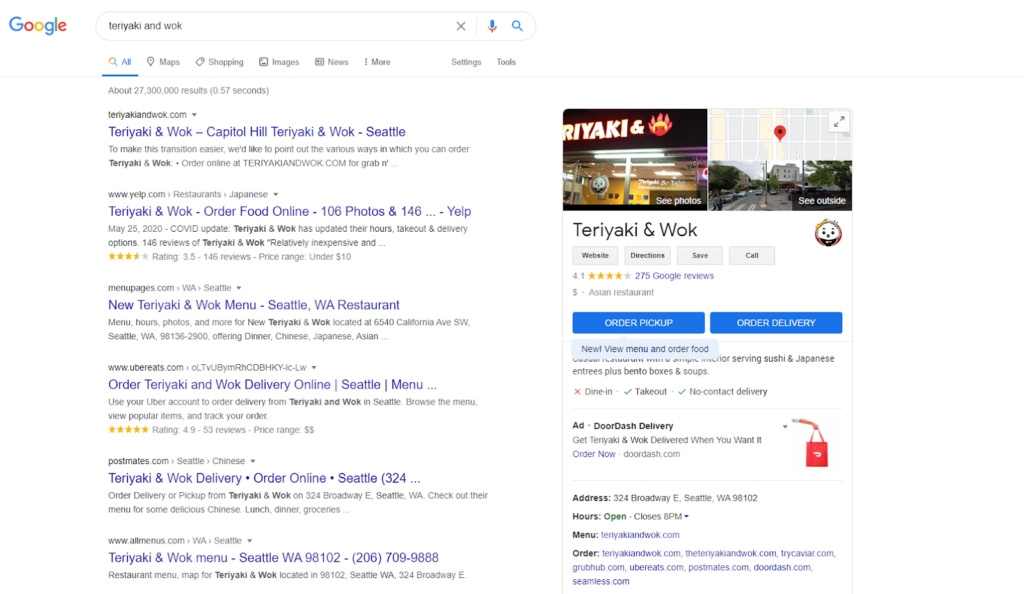
Raw data from the Traject Data SERP API comes in the form of JSON files that describe any given SERP, including the search features, ranked websites, and anything else that appears for that particular query. Imagine you query “teriyaki and wok” and you’re shown this SERP. You’ll notice that result #1 is a standard blue link, not a local pack, a video, or any other type of search feature.
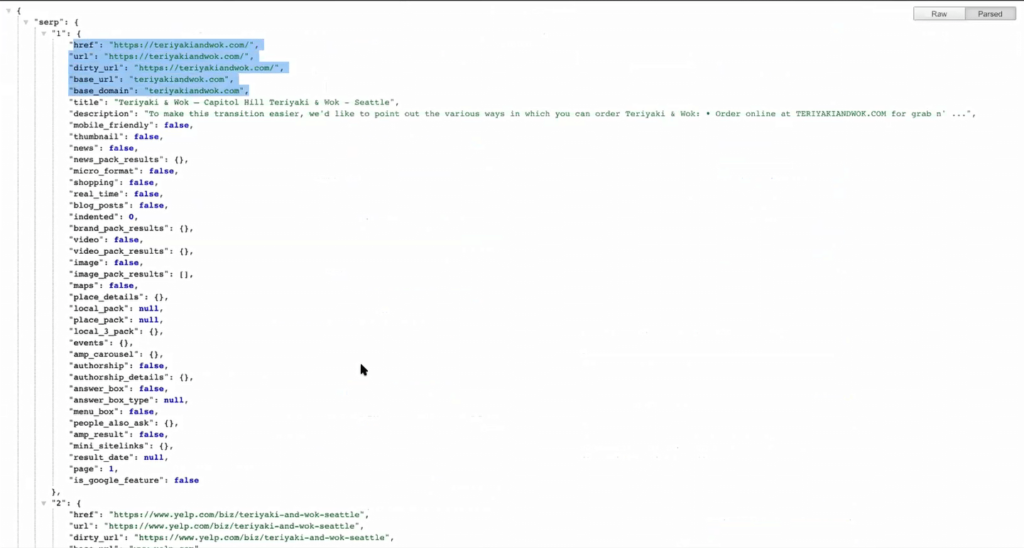
The output from the Traject Data SERP API for this query would look like this:
Underneath “SERP” in the JSON file, each ranking position will be labeled by number and list out the attributes of that ranking position. In the “teriyaki and wok” case, you can see the data for the link, the description, and which types of search features do and do not take up position #1 for that query.
If you were to keep scrolling, the same data would be listed for position #2, #3, and so on for that query’s SERP.
This more comprehensive set of SERP data points allows SEOs to increase their control over all the possible rich results at their disposal. Tracking this data will show rich results they’ve won and lost to competitors, search features that are new to a keyword after Google makes an algorithm update, and other data points that will help them home in on all of their high-return traffic opportunities.
These are some of the most common rich results that we provide data on. You can click through on each to learn more about how you can leverage them.
How is this data converted into something I can manipulate and draw insights from?
The information in the JSON files is pretty extensive to look through for just one SERP. This raw output would be almost impossible to manipulate without building logic, or using a tool that can sort through it to access what you need and create more relevant datasets.
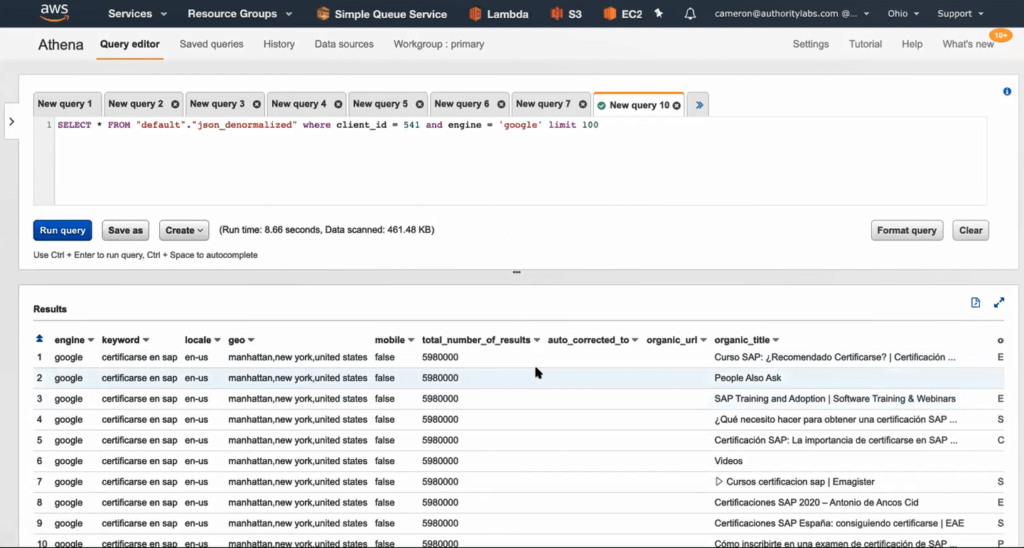
The Traject Data SERP API JSON files are stored in Amazon S3 or similar. There, the data points from the JSON files are structured and tagged into individual fields so that they are able to be queried, sorted, and more easily analyzed. After the JSON files have been given this structure, using a product like Amazon Athena gives you the ability to query the database and pull the selection that’s interesting to you.
This staging ground and additional ability to organize the data creates a way for previously unmanageable amounts of data to be pulled into subsets that are relevant for a certain report or analysis.
Leveraging a BI tool
The dataset is now ready to be connected to your BI tool which will allow you to visualize it for easy understanding. From there, you can build reports and combine it with your business’s other data, like sales and marketing data.
BI tools are an important cornerstone to this process because the visualizations allow users to discover new insights with the time and expertise (or bias) that would typically go into creating pivot tables to investigate a hypothesis.
With the various tools that are compatible with Traject Data, users can toggle between different types of visualizations much more deftly than building out a new analysis manually each time. Expert level BI users can manipulate the data into more complex visualizations, but beginner level users can still glean a multitude of insights from the visualizations the tool suggests, once the data finishes populating.
Traject Data keyword data is able to connect to all of the most common BI tools on the market. To make a decision on which BI tool to use, consider the required skill level, pricing, and capabilities below.
Tableau connects and extracts the data stored in various places, and is touted as being able to pull data from just about any platform imaginable. It can extract “simple” databases such as excel or pdf files, to more complex databases like Oracle or AWS.
After ensuring thorough data access, Tableau emphasizes its ease of content discovery by allowing users to organize resources by project, recommending relevant data, allowing ‘go back’ with revision history, and enabling search.
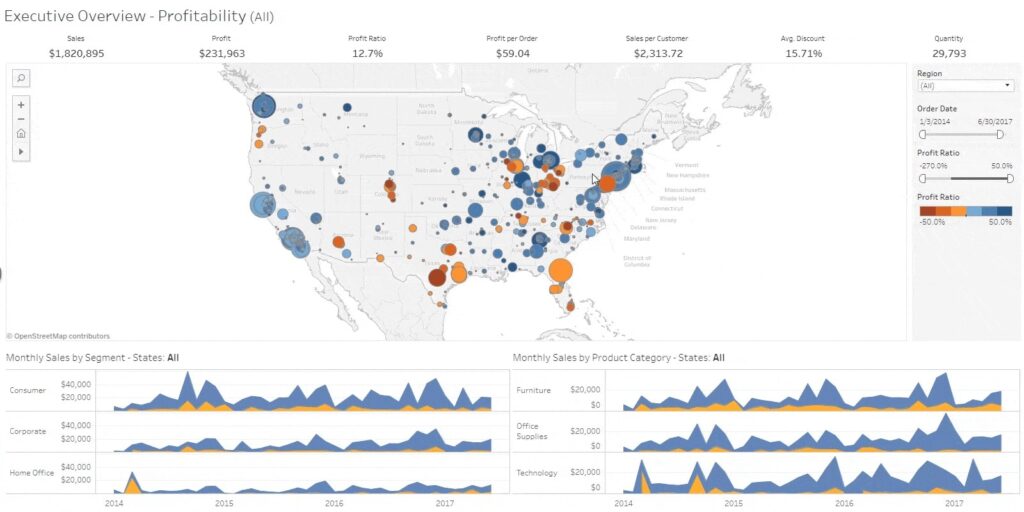
Here’s an example Tableau sales dashboard. You’ll notice that showing the insights is highly visual, and that analytics can be performed almost instantaneously as users change any setting on the dashboard. This viz uses Tableau’s clustering feature to uncover insights in the sales data across the United States.
Tableau divides their product tiers by implementation and user needs. First, your business will need to decide whether you’d like to host Tableau on-premise, in the public cloud, or have Tableau host your server. Then decide how many of each of the following user type you need:
Creator: This is a data analyst role who will load and standardize data. Every Tableau account is mandated to have at least one Creator
Explorer: general business user role, can make and edit visualizations
Viewer: can view and interact with visualizations Explorers and Creators have made
Tableau’s pricing differs between users of on-premise/public cloud and Tableau hosted, and bills annually. For on-prem, select the number of licenses you need:
Creator: $70 USD/user/month
Explorer: $42 USD/user/month
Viewer: $15 USD/user/month
Pros
Quick and easy representation of big data which helps in resolving the big data issues
Can be used with no coding or development knowledge
Easy to understand, drag and drop interface
Can use pretty much any data source imaginable—Tableau integrates with over 250 applications
Has an additional platform for cleansing and prepping data before it’s loaded and analyzed
There’s a mobile app with comparable functionality
Has a heavy community presence for learning in forums
Cons
Some users criticize its collaboration capabilities: The notification functionality is simple, and only an admin can configure scheduled email subscription. Users can use custom Python to create trigger-based notifications, but that practice isn’t baked into Tableau.
Can be a fairly expensive tool based on your business and needs
To leverage the full capabilities of Tableau, users report a much steeper learning curve that that of other BI tools.
Operates with a multitude of products that all handle a different aspect of the data analytics process. Some companies may enjoy the customized experience — it’s not for you if you’re looking for one tool that gives all users a transferable experience
The bottom line
Tableau is the top of the food chain for BI tools in terms of quality of analytics and visualization. However, for many users, the cumbersome process of piecing together multiple Tableau products and deploying on-prem may be too complex—and too expensive.
Looker is the data visualization tool owned by Google. Its main differentiator is its 100% browser-based experience, which eliminates the need for installation and maintenance at the same level as a tool like Tableau. Looker also emphasizes shareability in many of their opening statements, referring to the fact that the browser-based experience allows for link sharing, as opposed to sharing with files.
Like most other BI tools, Looker asserts that any novice can use it and that in-depth SQL knowledge can create more intricate reports, but isn’t strictly necessary. However, there does seem to be a significant investment in publishing lectures, documentation, and learning puzzles to appeal to Looker users across disciplines and learning styles.
With Looker, data analysts can use a language called LookML to create mini-applications that “add efficiency and power to data exploration.” Looker explains that the LookML syntax simplifies the development of powerful models and enhances the capabilities of SQL. According to them, “this language-based approach leads to faster query execution, and optimizes performance along the way.”
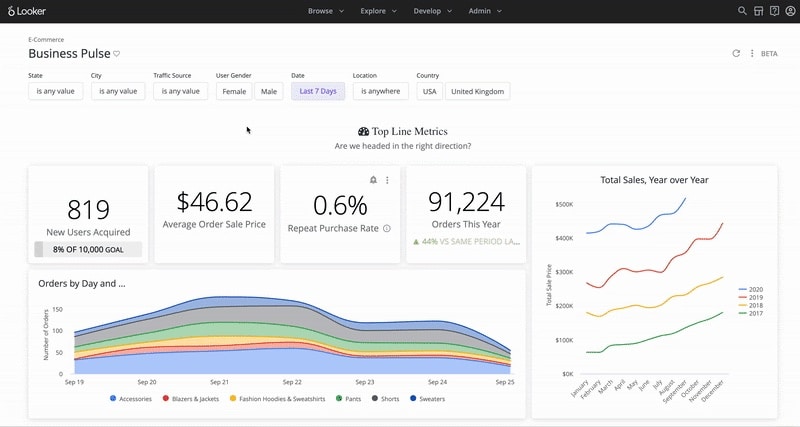
Below is an example of a Looker E-commerce dashboard that visualizes different data points from a sample company.
Looker is unique from other BI tools in that it doesn’t publicly share its pricing, reasoning that it’s customizable for small, medium and large businesses. SoftwareConnect estimates the following prices:
Generally $300-$500/user/month, up to 10 users
$50/user/month after 10 users
Pros
Emphasizes pre-built templates or blocks to speed up setup time and move more quickly to custom reports
100% browser-based experience eliminates the need for desktop client software installation and maintenance, and allows for link-based sharing of content – makes collaboration “frictionless”
Consistent platform experience for all users; for instance, they can complete tasks without shifting from one desktop tool (i.e. Tableau Desktop), to another (i.e. Tableau Prep Builder), and then to the web to complete specific tasks.
Users can leverage the ML code (that most say is fairly easy to learn) to help produce applications and optimize queries
Still works for those with no SQL knowledge, as they have a rich database of videos and learning materials
Cons
Some users report problems with load time, even calling the wait for a visualization “a run-in with the spinning wheel of death”
Users report lessened functionality and viewability when using the mobile app
If third-party estimates are correct, Looker can actually be more expensive than Tableau (which has gotten negative reviews for price) in some cases
Out-of-the-box dashboard templates can be incredibly useful, but some report difficulty attempting to customize them
Completely hosted means no options for fundamentally changing the tool besides waiting for a new release
The bottom line
If you don’t want to install and maintain an on-prem solution, Looker’s hosted platform has data visualization capabilities that rival or exceed other BI tools. You’ll be able to enjoy a report sharing experience that isn’t cumbersome, but watch out for load times and the inability to change the functions of the tool itself.
Domo Business Cloud, a low-code data app platform, refers to itself as: “the platform that allows everyone to drive action from data.” As with other top data visualization tools, users can combine data from disparate sources, and according to Domo, without needing duplication or pre-transformation to use.
Domo also includes collaboration tools that let teams communicate directly on visualizations with messages and annotations, in addition to scheduled updates and benchmarking alerts similar to those of other BI tools. There isn’t an on-prem deployment option, but Domo touts the cloud-based solution as a baked-in method to help your business scale indefinitely.
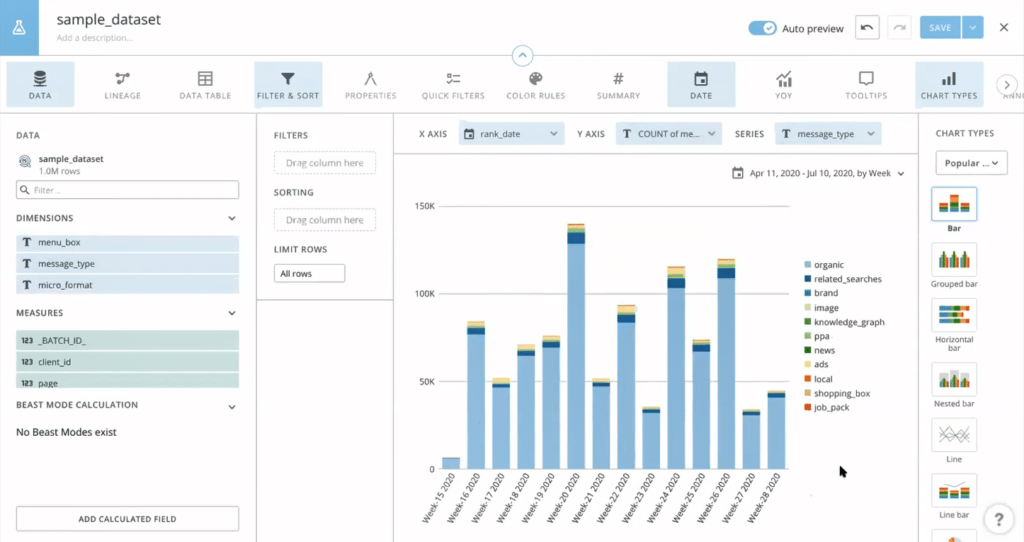
Below is an example of a Domo dashboard that uses Traject Data and shows the breakdown of all the different types of search features that appear in the chosen dataset.
Plans and Pricing
Domo’s editions are primarily divided by number of users, support level, and administrative options. The enterprise edition offers unlimited storage, data sets, personalized data permissions, and advanced admin controls.
Domo previously (until 2019) offered two plans: Professional ($175/user/month) and Enterprise ($250/user/month). They have since removed pricing from their website.
Pros
Regarded as one of the fastest-operating BI platforms
Provides templates based on business function
Many users enjoy the UI more than that of other BI tools, citing its “vibrance.” If you frequently use reports to woo stakeholders, this might be meaningful
Allows for team communication and collaboration directly on the platform
Seamlessly blends data from hundreds of sources, the reason Domo has been able to gain traction on Tableau
Offer 1-Click Apps: pre-built connectors that allow users to upload data without relying on IT
As a cloud-based solution, implementation tends to be shorter than on-prem solutions like some Tableau
Offers a full mobile app
Cons
Can be difficult to configure connectors from different sources all at once
No on-prem deployment option
If you plan to create many similar reports, some users complain that you can’t copy a report and make slight changes to the copy, as it will update the original
The bottom line
If your business favors cloud-based over on-prem and will be using the tool for extensive communication and collaboration while building visualizations, Domo is a great option.
You can expect that Power BI, the data visualization tool owned by Microsoft, will play nicely with other Microsoft products like Azure and Office. In fact, this is one of the first points that the Power BI website confirms.
These other Microsoft products, such as Power Apps, Power Automate, and Power Virtual Agents that create an “end to end” experience give users a feeling similar to picking and choosing certain Tableau products for a more customized experience, not the singular consistent experience of Looker and Domo.
Power BI connects to most types of on-premise databases, and they have a large and growing list of cloud-based connection options as well. Users report that it also works well for companies that don’t have a data warehouse solution, because Power BI acts as a facilitator that enables data set processing.
It has around 16 different chart types, which is a good, middle-of-the-road amount if you want to represent your data in a variety of formats and visualizations.
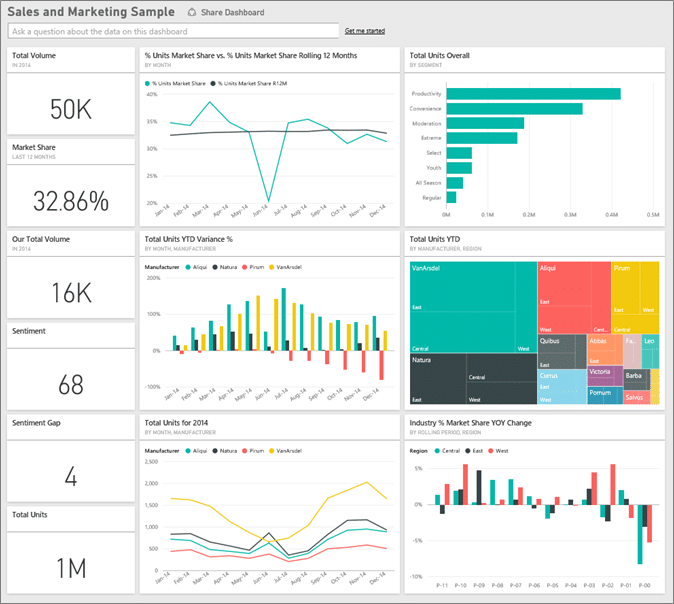
Below is an example of a Sales and Marketing Dashboard created with Power BI.
Power BI has 2 plans. The Pro plan is the most inexpensive BI solution out of comparable tools in the market, but the Premium plan can get pricey.
Power BI Pro
Self-service and modern BI in the cloud
Collaboration, publishing, sharing, and ad-hoc analysis
Fully managed by Microsoft
$9.99/user/month
Power BI Premium
Enterprise BI, big data analytics, cloud and on-premises reporting
Advanced administration and deployment controls
Dedicated cloud compute and storage resources
Allows any user to consume Power BI content
$20/user/month or $4,995/capacity/month for dedicated cloud compute and storage resource with annual subscription
Pros
The most inexpensive tool of its caliber on the market
Like the other tools, Power BI connects to hundreds of data sources and can read data from Microsoft Excel and text files like XML and JSON
Boasts a mobile app with comparable functionality
Anyone with moderately advanced Excel skills is likely to have an intuitive experience, as users report the functionality as being similar
Microsoft releases updates to Power BI monthly and listens to the user community. If you submit suggestions for improvements, other users can rank the suggestions
Plays well with Excel and is has easy export functionality
Cons
Limits the size of datasets that you can pipe in – can try creating multiple queries to process the entire data set or shift to Power BI Premium
On-premises reporting is only included in the Power BI Premium package, which can add additional costs
Some users report the design is not intuitive and the UI/UX isn’t as pleasant as other tools
Custom visuals don’t seem to be configurable – limitations to what can actually be changed if you want to optimize a visual
No solution for data scrubbing, so data needs to be cleaned before using Power BI
The bottom line
If you don’t have a lot of budget and won’t be using datasets that exceed the size limit, Power BI will give you top-tier analytical capabilities—and may even listen to you on the updates you’d like to see.
Final Thoughts on Choosing a BI Tool for Traject Data
Because Traject Data works with all major BI tools on the market, decide on a tool that fits your business best with the above information in mind.
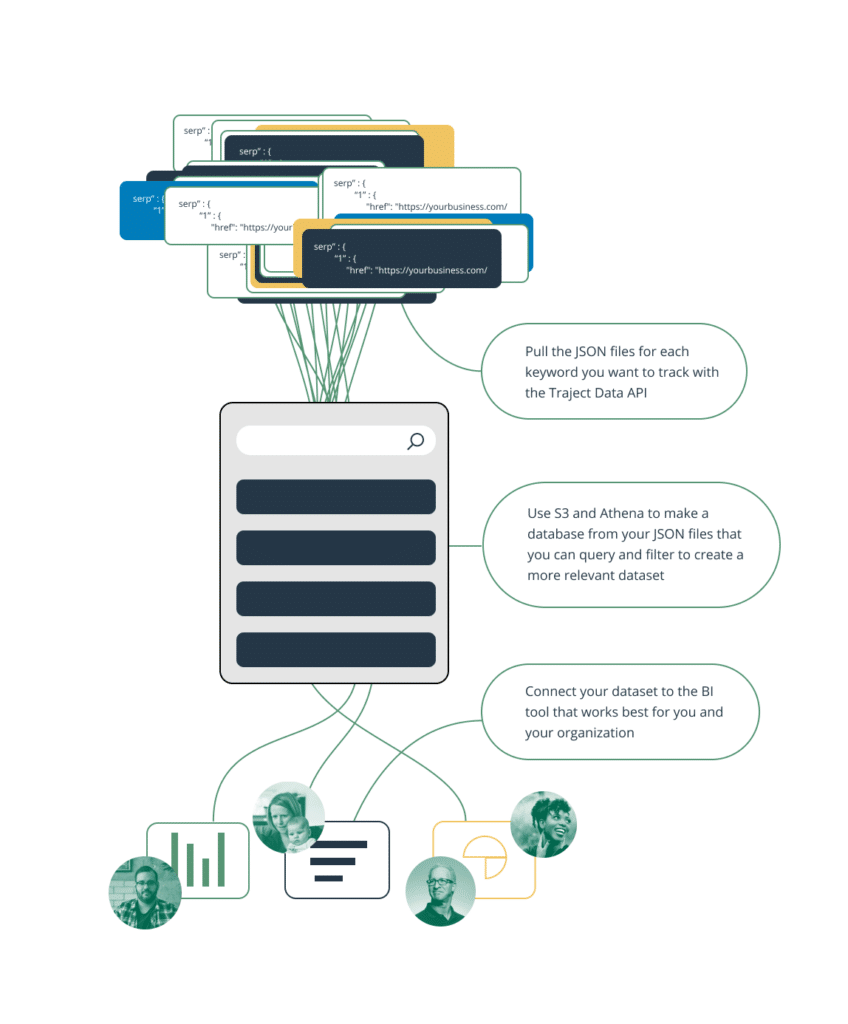
Once you’ve chosen a BI tool, you’re prepared to follow these 3 steps to begin visualizing the additional SEO data points our SERP API provides:
Pull the JSON files for each keyword you want to track with the Traject Data SERP API.
Use S3 and Athena (for example) to make a database from your JSON files that you can query and filter to create a more relevant dataset.
Connect your dataset to the BI tool that works best for you and your organization.
Complete these steps, and you’ll have visualizations of endless keyword data to inform your SEO strategy and business decisions as a whole.
Ready to See What Traject Data Can Help You Do?
We’re your premier partner in web scraping for SERP data. Get started with one of our APIs for free and see the data possibilities that you can start to collect.
Ecommerce businesses frequently encounter inventory challenges. In fact, 56% of retailers report difficulties with accurate inventory tracking. Keeping track of competitor inventory levels is a game-changer for online retailers. Whether you’re looking to maximize sales, anticipate demand, or make smarter pricing decisions, scraping competitor inventory data provides valuable insights. This guide will walk you through the benefits, legal considerations, challenges, and best tools for scraping competitor inventory levels effectively.
Benefits of Scraping Competitor Inventory Data
Monitoring competitor stock levels allows online retailers to make data-driven decisions and stay ahead in a competitive market. Here are some key benefits:
Identify When Competitors Run Out of Stock: If a competitor runs out of a high-demand product, you can capitalize on the opportunity by adjusting your pricing, boosting promotions, or ensuring your stock is well-maintained.
Efficient Inventory Management: Poor inventory management causes businesses to lose up to 11% of their annual revenue, mainly due to stockouts and overstocking.
Improved Omnichannel Management: For companies selling across multiple platforms, scraping ensures accurate inventory representation across all channels.
Better Supplier Monitoring: Scraping can extend to supplier websites, helping businesses plan inventory more effectively.
Monitor the velocity of competitor sales: When scraping inventory levels over time, you can begin to track sales volumes.
How to Scrape Competitor Inventory Data Legally and Effectively
Scraping competitor inventory data can be incredibly useful, but it’s essential to follow legal and ethical best practices to avoid violating website terms of service or data privacy laws.
Best Practices for Legal Scraping
Use APIs When Available: Leveraging an API ensures compliant data collection while reducing maintenance costs.
Scrape Only Publicly Available Data: Avoid accessing password-protected, user-restricted, or proprietary information.
Implement Rate Limiting: Prevent excessive requests that could overwhelm the target website and lead to IP bans.
Focus on Factual Data: Stick to publicly available product codes, prices, and stock levels, which are typically not protected by copyright.
Comply with Data Privacy Regulations: Ensure compliance with laws like GDPR and CCPA by avoiding the collection of personal data.
Steps to Scrape Competitor Inventory Data
Identify Competitors: Determine which retailers you want to track and which specific inventory data is most relevant to your business.
Select a Scraping Tool or API: You can either develop a custom scraper using Python or use a dedicated web scraper API.
Set Up Your Scraper: Configure it to collect essential data such as product names, SKUs, pricing, and stock levels.
Parse and Structure the Data: Organize the collected data in a structured format like CSV or JSON. A dedicated web scraper API can automate the process of structuring and parsing the data for quicker analysis.
Schedule Regular Monitoring: Inventory levels fluctuate frequently, so set up automated scraping at regular intervals to maintain accuracy.
Main Challenges of Scraping Inventory Data
Extracting value from inventory data presents unique challenges compared to other web scraping applications, such as price monitoring.
Location-Specific Data: Many retailers require a zip code input to display inventory, meaning you must ensure your scraper accounts for regional availability.
In-Stock Validation vs. Inventory Levels: Some sites provide data on whether an item is in stock, while others provide a count of in-stock items.
Frequent Website Changes: Retailers often update their website structures, requiring scrapers to be regularly maintained.
IP Blocking & Anti-Scraping Measures: Some retailers implement security measures to prevent automated scraping, making API-based solutions a more reliable option.
Where to Find Inventory Data
If you’re looking to scrape inventory data, here are some common sources:
Google Shopping – Aggregates product availability across multiple retailers.
Amazon – Provides stock levels for millions of products.
Walmart – Offers in-store and online inventory tracking.
Target – Displays local store stock levels.
Home Depot – Shows inventory for both online and in-store products.
Benefits of Traject Data’s Inventory API
Traject Data’s Inventory API simplifies competitor inventory tracking by providing reliable, real-time data from multiple sources with flexible pricing options. Here’s what makes it stand out:
Real-Time Updates: Get up-to-the-minute stock levels directly from retailer websites.
Multiple Retailers: Access inventory data from a wide range of marketplaces to get a comprehensive view of product availability.
Structured Data Format: The API delivers clean, structured data, reducing the need for manual parsing.
If you’re ready to gain a competitive edge with real-time inventory insights, explore Traject Data’s APIs today and start optimizing your inventory strategy.
Ready to See What Traject Data Can Help You Do?
We’re your premier partner in web scraping for SERP data. Get started with one of our APIs for free and see the data possibilities that you can start to collect.
Sales forecasting on Amazon is a critical component of any successful Amazon business. Improving forecasting accuracy, even by a small percentage, can significantly impact a company’s production and financial planning, marketing strategies, inventory control, and supply chain management.
Without reliable sales forecasts, ecommerce businesses risk overstocking (leading to increased storage costs and potential waste) or understocking (resulting in lost sales and dissatisfied customers). By investing in sales forecasting, Amazon ecommerce businesses can optimize operations, reduce costs, and maximize profits.
But how do you forecast your Amazon sales for a new product you haven’t sold before? Let’s dive in.
What Is Amazon Sales Forecasting?
Amazon sales forecasting is the practice of predicting future customer sales and demand for products sold on Amazon. It involves analyzing historical sales data, market trends, and other relevant factors to estimate future sales volume. This allows sellers to optimize inventory management and make informed decisions about stock levels and pricing to meet customer needs effectively.
How to Forecast Ecommerce Sales using Amazon Data
Amazon sales forecasting relies on analyzing historical data and market trends to predict future demand. But where do you get this data? Fortunately, Amazon is a massive ecommerce platform with a wealth of publicly available data. As of 2025, Amazon holds a 37.8% shareshare of the US ecommerce market—and it’s still growing. Including third-party sellers, the total number of products available on Amazon exceeds 350 million, making it a rich source of historical sales data. So, no matter what product you’re interested in selling, you’ll likely be able to find relevant data for analysis.
Businesses typically use a combination of statistical models, machine learning algorithms, and domain expertise to refine their forecasts. The process often includes:
Collecting Data – Gather historical sales data from key sources like Amazon, Walmart, and Google. Consider seasonal trends, competitor insights, and external market factors for a comprehensive analysis.
Choosing a Forecasting Model – Utilize time-series analysis, regression models, or AI-driven machine learning techniques.
Adjusting for Market Conditions – Factor in economic trends, supply chain disruptions, and promotional campaigns.
Validating the Forecast – Compare past forecasts to actual sales to refine and improve accuracy over time.
A well-executed sales forecasting strategy helps ecommerce businesses anticipate demand fluctuations and make proactive business decisions. Not all market conditions can be predicted, so you’ll need to monitor and maintain your algorithm as new market variables are introduced.
What Is the Best Formula for Amazon Sales Forecasting?
For ecommerce demand forecasting, especially when selling a product on Amazon, several commonly used formulas can help predict the number of units sold. Here are some of the most relevant methods:
Exponential Smoothing
A forecasting technique that uses a weighted average of past data points to predict future values.
Time Series Analysis
This method analyzes historical data to identify patterns and trends in demand. It uses statistical techniques to forecast future demand based on past patterns.
Sales Rank-Based Estimation
Amazon sellers often use sales rank to estimate potential sales. For example, if a product at rank 25,000 sells 250 units per month, a product at rank 5,000 might sell approximately five times more, or 1,250 units.
Machine learning methods are becoming increasingly prevalent in demand forecasting. However, historical data is crucial—you’ll need a statistically significant dataset to make accurate predictions.
Accurate forecasting requires continuous monitoring and adjustment based on actual performance and market conditions. As the market changes, you’ll need to refine your calculations.
What Is an Amazon Sales Estimation API?
If you’re not a machine learning expert or mathematician, you’ll likely want to leverage an Amazon sales estimation tool. An Amazon Sales Estimation API is a software application that allows businesses to predict future sales revenue for their online store by analyzing historical sales data, market trends, and other relevant factors.
How It Works:
Retrieves and processes historical sales data from Amazon for a product.
Uses machine learning and statistical models to generate accurate sales forecasts.
Provides real-time sales projections to assist with inventory management, marketing, promotion, and pricing strategies as the market evolves.
Benefits of Using an Amazon Sales Estimation API
Improved Inventory Management – Accurate forecasts help businesses maintain optimal stock levels, reducing overstocking and stockouts.
Reduced Costs – Minimizes expenses associated with overstocking and storage.
Enhanced Marketing Strategies – Understanding future demand enables businesses to fine-tune marketing efforts for peak seasons and targeted campaigns.
Optimized Pricing Strategies – Forecasting demand allows businesses to optimize pricing for maximum profitability.
Data-Driven Decision Making – Advanced analytics provide valuable insights that drive smarter, more strategic business choices.
Increased Customer Satisfaction – Ensures products are readily available when customers need them.
Traject Data’s Amazon Sales Estimation API
For businesses looking for a powerful and reliable sales forecasting solution, Traject Data’s Amazon Sales Estimation API is designed to provide accurate and actionable insights.
Key Features:
Sales Estimates – Provides sales projections for individual products and categories.
Real-Time Data Access – Uses up-to-date market trends and customer behavior insights so you can continually monitor while the market evolves.
Customizable Forecasting Parameters – Adjust forecasts based on your products, industry, and geographic location.
By leveraging Traject Data’s Amazon Sales Estimation API, ecommerce businesses can make informed decisions on inventory, pricing, and marketing strategies—ultimately driving higher profitability.See how Traject Data’s Advanced Amazon Sales Estimation API can transform your sales forecasting and explore our detailed API documentation.
Ready to See What Traject Data Can Help You Do?
We’re your premier partner in web scraping for SERP data. Get started with one of our APIs for free and see the data possibilities that you can start to collect.
In the dynamic realm of B2B marketing, a deep understanding of the Search Engine Results Page (SERP) is paramount for gaining a competitive edge. To truly maximize your online visibility and drive relevant traffic, leveraging a SERP API for B2B is essential. This powerful tool allows you to go beyond basic SEO, providing critical insights into search results that you might otherwise be missing.
What is B2B SERP?
B2B SERP (Business-to-Business Search Engine Results Page) refers to the set of webpages that appear on a search engine, like Google or Bing, when business professionals search for industry-related information. Unlike B2C searches, B2B SERP is focused on connecting businesses looking for products or services from other businesses.
Why SERP Matters for B2B Marketers
B2B SERP and SEO is a strategy designed to increase organic search traffic and keyword rankings for business websites. A successful B2B SEO strategy puts a company’s website in front of decision-makers actively searching for solutions. Research shows that 72% of B2B buyers begin their research on a search engine, highlighting the importance of SERP visibility.
B2B vs B2C SERP: What’s the Same
SERP Basics remain the same whether you’re targeting business or consumers. While B2B and B2C SEO strategies have distinct differences, several key elements are important for both approaches:
Keyword research and optimization: Both B2B and B2C SEO require thorough keyword research to target relevant terms that align with user search intent.
Quality content creation: Producing valuable, engaging content is crucial for both B2B and B2C SEO to attract and retain visitors.
On-page optimization: Proper optimization of meta tags, headers, and internal linking structures is essential for both types of SEO.
Technical SEO: Both B2B and B2C require strong technical SEO, including mobile optimization and fast page load speeds. However, B2B SEO may involve more complex site structures due to the need for detailed product or service information.
Link building: Acquiring high-quality backlinks remains a crucial aspect of SEO for both B2B and B2C strategies.
Schema markup: Implementing structured data can enhance search visibility for both B2B and B2C websites.
Performance metrics tracking: Both approaches require monitoring and analysis of relevant SEO metrics to measure success and make data-driven decisions.
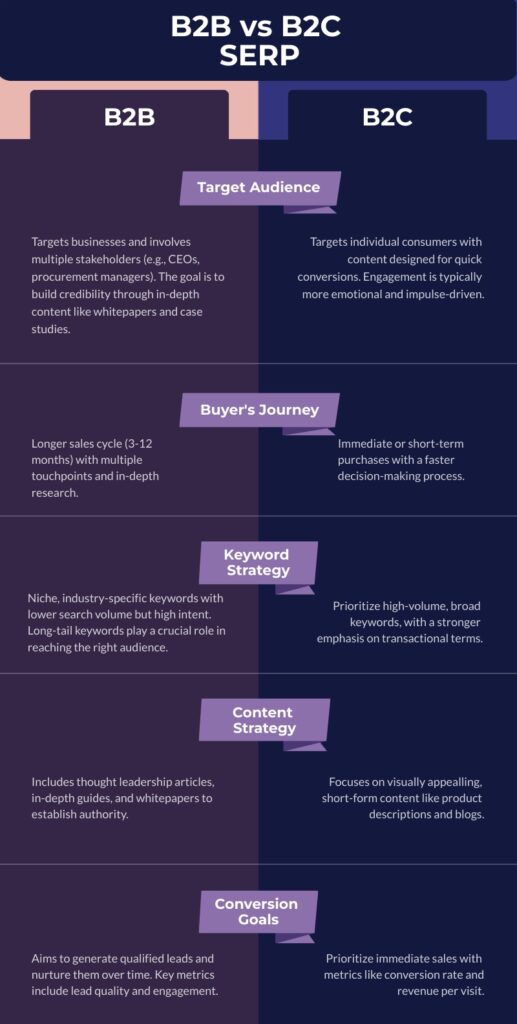
B2B vs. B2C SERP: Key Differences
While the fundamentals of SEO apply to both B2B and B2C, the execution differs significantly due to audience, sales cycle, and intent. Here’s what sets them apart:
Target Audience and Decision-Making
B2B SERP: Targets businesses and involves multiple stakeholders (e.g., CEOs, procurement managers). The goal is to build credibility through in-depth content like whitepapers and case studies.
B2C SERP: Targets individual consumers with content designed for quick conversions. Engagement is typically more emotional and impulse-driven.
Buyer’s Journey and Sales Cycle
B2B SERP: Features a longer sales cycle (3-12 months) with multiple touchpoints and in-depth research.
B2C SERP: Often involves immediate or short-term purchases with a faster decision-making process.
Keyword Strategy
B2B SERP: Prioritizes niche, industry-specific keywords with lower search volume but high intent. Long-tail keywords play a crucial role in reaching the right audience. While niche keywords may drive less traffic, their high relevance ensures you attract engaged users who are more likely to convert.
B2C SERP: Prioritizes high-volume, broad keywords with a stronger emphasis on transactional terms.
Content Strategy
B2B SERP: Includes thought leadership articles, in-depth guides, and whitepapers to establish authority.
B2C SERP: Focuses on visually appealing, short-form content like product descriptions and blogs.
Conversion Goals and Metrics
B2B SERP: Aims to generate qualified leads and nurture them over time. Key metrics include lead quality and engagement metrics.
B2C SERP: Prioritizes immediate sales with metrics like conversion rate and revenue per visit.
Steps to Enhance Your B2B SERP Strategy
Create Buyer Personas: Tailor content and keywords to the search behavior of key decision-makers.
Conduct Niche Keyword Research: Focus on specific industry terms and long-tail keywords that signal purchase intent.
Develop a Topic Cluster Strategy: Use pillar pages linking to related content to improve site structure and SEO authority.
Optimize Product & Service Pages: Enhance metadata, title tags, internal linking, and structured data.
Create High-Value Content: Publish expert guides, case studies, and whitepapers to establish authority.
Implement Technical SEO Best Practices: Ensure fast page speeds, mobile optimization, and proper schema markup.
Build a Strong Backlink Profile: Gain high-quality backlinks through guest posting and industry collaborations.
Monitor & Adjust Strategy Regularly: SEO evolves constantly; track SERP trends and competitor movements.
By implementing these steps, B2B companies can improve their SEO performance, increase organic traffic, and drive more qualified leads to their website. Don’t expect immediate results. SERP rankings and SEO is a long-term game, so it’s important to take your time, run experiments, and implement best practices.
Why Use a SERP API for B2B SEO?
SERP APIs provide real-time search data, helping marketers analyze keyword rankings, competitor performance, and search trends at scale. Leveraging a SERP API saves time and reduces errors while offering a comprehensive view of the market landscape. You’re able to customize your data analysis by selecting the most relevant fields for your business while obtaining a complete picture of the results. Search engines are constantly updating their algorithms and site structure which makes manual tracking costly. Using a SERP API to scrape publicly available data from search engine results pages (SERPs) is legal as long as you adhere to the search engine’s terms of service and do not violate them. Leveraging a reputable SERP API provider reduces your risk of non-compliance.
How to use a B2B SERP API:
Choose a Provider: Select an API that meets your data needs and budget.
Get an API Key: Sign up and obtain authentication for access.
Build Search Queries: Target relevant industry keywords.
Send API Requests: Retrieve live SERP data for analysis.
Analyze & Optimize: Use the data to refine your SEO strategy and outperform competitors.
Try Traject Data’s SERP API Today
Traject Data offers industry-leading SERP and eCommerce APIs, providing granular localization, deep data sources, and high-speed performance. Our APIs help businesses optimize pricing, track competitors, and gain actionable market insights. Try Traject Data’s SERP API for free and take your B2B SEO strategy to the next level.
Ready to See What Traject Data Can Help You Do?
We’re your premier partner in web scraping for SERP data. Get started with one of our APIs for free and see the data possibilities that you can start to collect.
The future of ecommerce is omnichannel, and a web scraper API for omnichannel ecommerce is essential for staying competitive. While multichannel selling expands your reach across multiple platforms, omnichannel ecommerce goes a step further by creating a seamless shopping experience across all touchpoints. This approach enhances brand consistency, improves customer engagement, and reduces risk. In this article, we’ll explore the biggest challenges of omnichannel ecommerce and how a web scraper API can help you monitor and optimize your strategy effectively.
Multichannel vs. Omnichannel Ecommerce: What’s the Difference?
Multichannel – The goal of multichannel e-commerce is to maximize reach by being present on as many sales channels as possible—Amazon, Walmart, social media, websites, physical stores, and more. However, these channels often operate independently, leading to inconsistencies in pricing, inventory, and messaging.
Omnichannel – Retailers that use an omnichannel strategy don’t just sell on multiple platforms—they ensure a consistent, unified experience across them all. Messaging, branding, and pricing are harmonized, so customers receive the same experience whether they shop online, in-store, or on a marketplace like Amazon. The goal is to provide seamless transitions between channels, fostering trust and customer loyalty.
Still not sure if omnichannel is worth the investment? Consider these compelling statistics:
Companies with omnichannel customer engagement see a 179% increase in sales revenue on average.
Omnichannel shoppers generate 30% higher lifetime value, making them more profitable long-term.
Retailers using three or more channels see a 250% boost in consumer engagement.
90% of consumers expect a seamless brand experience across all channels—consistency matters more than ever.
The Biggest Challenges of Omnichannel Ecommerce
While omnichannel ecommerce offers a superior customer experience, it comes with significant challenges. Businesses must maintain consistency across platforms to avoid damaging their brand and losing customer trust.
1. Pricing and Messaging Consistency
Customers expect uniform pricing and messaging regardless of where they shop. However, price fluctuations, promotional inconsistencies, and mismatched product descriptions can create confusion and harm credibility.
2. Brand Image & Customer Experience
A strong, recognizable brand is key to customer loyalty. When branding varies across platforms, it creates a disjointed shopping experience that can weaken customer trust and engagement.
3. Data Visibility & Channel Conflict
Many businesses struggle to access real-time insights on sales, inventory, and customer behavior across multiple channels. When different departments prioritize their own sales strategies over an integrated approach, it can lead to conflicts that hurt the overall business.
4. Inventory and Order Management
Keeping stock levels synchronized across all platforms is crucial to avoid overselling or stockouts. Without accurate real-time inventory updates, businesses risk losing sales and disappointing customers.
How a Web Scraper API Can Solve Your Omnichannel Challenges
A web scraper API is an essential tool for maintaining consistency in omnichannel e-commerce, and improving customer experience. Here’s how it helps:
✅ Real-time Data Monitoring – Ensures businesses always have up-to-date information on pricing, inventory, and competitor trends. ✅ Automated Data Collection – Reduces manual effort and increases efficiency in tracking multiple sales channels. ✅ Competitor Benchmarking – Helps businesses stay competitive by tracking competitor pricing and product availability. ✅ Brand Compliance Monitoring – Ensures accurate product descriptions, pricing, and messaging across all platforms. ✅ Review Monitoring – Track customer feedback across multiple channels to ensure customer satisfaction and address issues proactively.
Future-Proof Your Omnichannel Strategy with Traject Data
To succeed in omnichannel ecommerce, businesses need the right tools to collect and analyze data seamlessly. That’s where Traject Data comes in.
Reliable Infrastructure – Get real-time data with minimal latency and downtime.
Seamless Integrations – Schedule automated data pushes to your preferred destination.
Scalability – Handle tens of millions of requests daily as your business grows.
Comprehensive Documentation & Support – Get expert guidance and fast issue resolution.
Flexible Pricing – Scale costs based on your needs with a free trial before committing.
Clean, Structured Data – We handle data parsing, so you get accurate results without extra processing.
Ready to take your omnichannel data monitoring to the next level? Try Traject Data for free and ensure consistency across every platform.
Ready to See What Traject Data Can Help You Do?
We’re your premier partner in web scraping for SERP data. Get started with one of our APIs for free and see the data possibilities that you can start to collect.
Digital technology has transformed consumer purchasing power. We can buy anything, anywhere, anytime, and the market is flooded with competition. As of 2025, there are approximately 30.7 million e-commerce stores worldwide. In the crazy world of ecommerce, your pricing strategy can make or break your business.
Companies that implement a structured pricing strategy can see a 40% increase in revenue year-over-year. But how do you implement an effective pricing strategy? A successful pricing strategy must be data-driven. Web scraping APIs for price tracking and competitive pricing provide real-time insights to help businesses make data-driven decisions and stay ahead of the competition.
The Role of Web Scraping APIs in Pricing Strategy
The beauty of online retail means that adjusting your prices based on market conditions is easy. The days of brick-and-mortar fixed pricing are gone. One in five ecommerce businesses now use dynamic pricing, automatically adjusting prices based on demand and inventory. Amazon, in particular, is known for its sophisticated dynamic pricing algorithms which update prices every few minutes based on demand, stock levels, and competitor pricing. Walmart is close behind, changing prices daily.
The ability to track and analyze competitor pricing trends across multiple channels gives businesses an advantage. However, dynamic pricing makes it nearly impossible to manually stay on top of industry pricing trends. This is where price monitoring scraper APIs come in—they automate pricing intelligence, allowing businesses to track prices in real-time.
Major E-Commerce Platforms for Price Scraping
E-commerce giants like Amazonand Walmart dominate the online marketplace and set industry-wide pricing standards. Extracting pricing data from these platforms provides valuable insights into competitive pricing trends. Monitoring these marketplaces helps businesses react quickly to pricing shifts and implement strategic adjustments to stay ahead.
Challenges in Price Scraping
While price scraping offers undeniable benefits, it also comes with challenges. Amazon and Walmart use sophisticated anti-scraping measures, including:
Bot detection
Rate limiting
IP blocking
CAPTCHAs
This results in frequent outages for homegrown and popular web scraping tools. The best price monitoring API for e-commerce must include advanced technology to handle frequent data updates, maintain accuracy, and avoid detection.
Why Your Business Needs a Pricing API
A pricing API improves reliability and reduces downtime, ensuring uninterrupted access to real-time pricing data. Unlike traditional scraping methods, it’s faster, more efficient, and requires minimal maintenance.
A robust price monitoring API includes:
Built-in proxy management and anti-scraping defenses to bypass bot detection.
Automated updates that adapt to website changes without breaking.
Faster insights than manual scraping, keeping you ahead of competitors.
Use Cases for a Pricing Monitoring API
Competitive Pricing Analysis – Compare competitor pricing and adjust your strategy accordingly.
Identify Market Trends – Understand shifts in consumer demand and pricing fluctuations.
Price Matching Made Easy – Match or beat competitor prices to attract more customers.
Optimized Promotions – Plan strategic discounts using real-time pricing data.
Validate Supplier & Distributor Contracts – Ensure pricing agreements are being upheld across all sales channels.
Introducing Traject Data’s New Pricing Solution
At Traject Data, we know how important real-time pricing data is to your strategy. That’s why we’re excited to introduce our latest feature:
Reliable Infrastructure – Get real-time data with minimal latency and downtime.
Seamless Integrations – Schedule automated data pushes to your preferred destination.
Scalability – Handle tens of millions of requests daily as your business grows.
Comprehensive Documentation & Support – Get expert guidance and fast issue resolution.
Flexible Pricing – Scale costs based on your needs with a free trial before committing.
Clean, Structured Data – We handle data parsing, so you get accurate results without extra processing.
Ready to Optimize Your Pricing Strategy?
The best way to automate price monitoring with an API is to leverage a trusted pricing intelligence solution like Traject Data. Contact us today to learn how our pricing monitoring APIs can help you gain a competitive edge!
Ready to See What Traject Data Can Help You Do?
We’re your premier partner in web scraping for SERP data. Get started with one of our APIs for free and see the data possibilities that you can start to collect.
Amazon dominates the online retail space, holding 37.6% of the U.S. e-commerce market as of 2025—far surpassing competitors like Walmart. With over 310 million users worldwide and 353 million products available, its reach is unmatched. A staggering 89% of consumers prefer Amazon over other online retailers, and beyond e-commerce, Amazon commands 10.4% of the overall U.S. retail market, solidifying its influence across the industry. For businesses looking to stay competitive, an Amazon scraper API is an essential tool for gathering real-time product data, monitoring pricing, and analyzing market trends. In this article, we’ll explore the best Amazon scraper APIs to help you make data-driven decisions.
Benefits of Using Amazon Scraper APIs
Amazon’s pricing strategies and vast data repository profoundly shape the retail market, influencing consumer expectations and pushing competitors to adapt—a phenomenon often referred to as the “Amazon Effect.” This dominance makes publicly available data from Amazon’s site incredibly valuable for businesses seeking to optimize their strategies. However, writing and maintaining your own scraping scripts to collect this data is a labor-intensive task. When scraping data from Amazon, you face a list of challenges:
Dynamic page structure: Frequent website updates can break scrapers relying on specific HTML elements. Additionally, Amazon uses A/B testing to evaluate layouts and features.
CAPTCHA and anti-scraping mechanisms: Automated scraping attempts are often blocked by CAPTCHAs or other anti-bot techniques.
Rate limiting: Amazon may throttle requests, slowing down data extraction if not managed properly.
Legal considerations: While scraping public product data is generally allowed, understanding Amazon’s terms of service is essential to avoid compliance issues.
Data cleaning and validation: Scraped data may require extensive processing to remove irrelevant information and ensure accuracy.
Scalability issues: Extracting large data volumes can become computationally expensive without efficient techniques or cloud-based solutions.
And the list is constantly evolving as Amazon develops new ways to combat scraping scripts.
Using a web scraping API tailored for Amazon’s complex structure simplifies these challenges, offering cost-effective, scalable solutions.
Key Criteria for Choosing an Amazon Scraper API
Not all scrapers are created equal. When selecting an Amazon data provider, consider these factors:
Reliability: Ensure the API delivers real-time data with minimal latency and downtime.
Integrations: Look for seamless compatibility with existing tools or analytics platforms, including batch automation and delivery options.
Documentation and Support: Comprehensive documentation reduces the learning curve, while responsive customer support ensures prompt issue resolution.
Scalability and Speed: Choose a provider capable of handling large data requests without performance drops.
Compliance: Partner with vendors who adhere to Amazon’s terms of service.
Pricing. Flexible, scalable pricing is also key, allowing you to adjust costs based on your current needs as your business grows. Before committing to a contract, leverage a free trial to explore its capabilities and assess whether it’s suitable for your needs.
Data cleaning and parsing. Some APIs return data in raw, unstructured formats that require additional parsing to remove extraneous information, which can slow down analysis. Advanced APIs streamline this by automating the parsing process, providing ready-to-analyze data from the start.
Top 5 Amazon Scraper APIs for 2025
1. Traject Data Rainforest API
Key Features: Pre-configured for e-commerce, real-time data retrieval.
Best For: Retailers needing actionable, real-time e-commerce data. Seamlessly integrates with analytics and reporting tools.
Trial Availability: Free trial with a detailed demo available.
2. Oxylabs
Key Features: High-performance data extraction, structured JSON output, geo-targeting.
Best For: Proxy management.
Trial Availability: 7-day free trial with 5,000 requests.
3. Bright Data
Key Features: Rapid extraction of product details, prices, reviews, and seller information.
Best For: Market research, trend monitoring, and competitor analysis.
Trial Availability: Limited free plan available.
5. DataForSEO
Key Features: Reliable e-commerce data retrieval, customizable API options.
Best For: Businesses seeking SEO insights alongside Amazon data.
Trial Availability: Free trial available with limited requests.
Amazon Data Collection APIs Compared
Traject Data Rainforest API
Oxylabs
Bright Data
ScraperAPI
DataForSEO
Key Features
Real-time, pre-configured for e-commerce
High-performance, geo-targeting
Rapid extraction, structured output
Scalable, anti-bot measures
Reliable, customizable e-commerce data retrieval
Supported Locations
Global
Over 200
195
Global
Global
Output Formats
JSON, CSV
JSON
JSON, CSV, Excel
JSON
JSON, CSV, Excel
Free Trial
Free trial available
7-day free trial
No free trial
Limited free plan available
Free trial available
Best For
Retailers needing real-time, actionable data
Proxy Management
Market research
Trend monitoring
SEO insights and Amazon data
Ease of Use
User-friendly, Easy to integrate
Requires technical expertise
Requires technical expertise
User-friendly
User-friendly
Integrations
Seamless with analytics tools
Compatible with Python, Java
Wide language support
RESTful API support
SEO and e-commerce platforms
Documentation & Support
Detailed docs, dedicated support
Comprehensive, 24/7 support
Detailed guides, live support
Well-documented, chat support
Well-documented, dedicated support
Data Parsing
Fully structured, real-time updates
Structured JSON output
Extracts structured data
Parses raw HTML/JSON data
Structured output with SEO insights
Get Real-Time Amazon Data with Traject Data
Modern Amazon Data Collection APIs eliminate the complexities of manual scraping, offering streamlined, organized data collection tailored to your business needs. Among them, Traject Data’s Rainforest APIstands out with its pre-configured e-commerce focus, real-time updates, and ease of integration, making it a top choice for retailers and analysts alike. Click here to get started.
Ready to See What Traject Data Can Help You Do?
We’re your premier partner in web scraping for SERP data. Get started with one of our APIs for free and see the data possibilities that you can start to collect.
Walmart is the second-largest online retailer in the U.S., after Amazon. By 2025, Walmart’s online sales are projected to hit $3.4 billion. Together, Walmart and Amazon dominate the market so significantly that they effectively set the pricing trends for entire industries.
Walmart’s pricing strategies often send ripple effects across the retail landscape. Other retailers are frequently forced to match Walmart’s prices—often at the expense of their profit margins—or find creative ways to stand out. For anyone looking to stay ahead in the e-commerce game, keeping an eye on Walmart.com is essential.
Why Scrape Walmart?
Walmart lists over 43 million products online, and this number is increasing each year. This publicly available data is a goldmine for businesses looking to refine their e-commerce strategies. Some of the top use cases for scraping Walmart include:
Competitive Pricing Analysis: By extracting pricing information, companies can compare their prices with Walmart’s, helping them stay competitive in the market.
Market Research: Scraping product trends, customer reviews, and sales data provides valuable insights into market demand and consumer preferences.
Inventory Management: Tracking stock levels and product availability allows businesses to optimize their inventory and reduce stockouts or overstocking.
Discount and Promotion Tracking: Automated scraping of coupon data and promotional offers help you stay on top of the latest deals.
SEO and Content Creation: Analyzing Walmart’s product descriptions and keywords can inform SEO strategies and content creation for other e-commerce sites.
Why You Need an API to Scrape Walmart
To effectively track products, pricing, and reviews at scale, you need an automated solution like a Scraper API. While some developers attempt to build and maintain their own scraping tools, this requires ongoing maintenance and monitoring. Affordable solutions like Traject Data offer a cost-effective and hassle-free alternative. With Traject Data, you’ll get scalability, reliability, reduced maintenance, legal compliance, structured data, and support.
Getting Started with Traject Data’s Walmart Scraper API
BlueCart API returns clean, structured JSON or CSV results. You can achieve fine-grained control over your request using the request parameters.
Retrieving Search Results for Products on Walmart
Getting search result Walmart data with BlueCart API is as simple as making an HTTP GET request to the request endpoint. The only required parameters are api_key (sign up for free to get an API key) and type (which defines the type of Walmart data you’d like to retrieve). For example, to retrieve search results ( type=search ) for the search term highlighter pens , ordered by best selling products ( sort_by=best_seller ) the BlueCart API request would be:
The search results are shown within the search_results array. For full documentation on the search results response see the Search Results docs.
Getting Data for an Individual Product
Lets say we want to change our query to request a different type of data – information on a specific product, in this case the product with Item ID 27672251 on walmart.com . Here’s the BlueCart API request to achieve that:
Localizing Results to a Zipcode or Postal Code BlueCart API allows you to retrieve results as they would be seen by a user in a given zipcode or postal code by specifying the zipcode or postal code in the customer_zipcode request parameter.
For example, to request results as they would be seen by a user in US zipcode 77001 you should append the customer_zipcode=77001 request parameter.
For more documentation Traject Data’s Bluecart API visit our Help Center.
We’re your premier partner in web scraping for SERP data. Get started with one of our APIs for free and see the data possibilities that you can start to collect.
81% of consumers need to trust a brand to consider buying from it, but brand protection is becoming increasingly difficult in the digital age. A single negative article found online can cause a business to lose up to 22% of its customers. Approximately $2 trillion worth of counterfeit products are sold to consumers annually. With the massive size of the internet, brand protection and monitoring isn’t something that can be done manually. Businesses that want to protect their brand image online need data and tools. The most common tool is a brand monitoring scraper API, also known as a brand monitoring data collection API.
What is Brand Monitoring?
Brand monitoring is all about keeping your business’s reputation and identity safe from harm. It means stopping things like counterfeit products, fake websites, and misuse of your logos or trademarks. It’s also about protecting your customers from scams or misinformation that could damage their trust in your brand. In today’s fast-paced digital world, threats can pop up anywhere—on social media, review sites, or forums—so staying on top of them is key. By actively monitoring and addressing these risks, you can make sure your brand stays strong and customers know they can rely on you.
The Role of Scraper APIs in Brand Monitoring
Brand Monitoring Data Collection APIs, or web scraping APIs, are like your brand’s eyes and ears on the internet. They help you keep track of what’s being said about your business by gathering data from customer reviews, social media, pricing information, and search engine results pages (SERPs).
Keeping Tabs on Customer Sentiment. APIs can pull reviews from platforms like Amazon, Google, Bing, and Walmart, making it easier to spot trends in customer satisfaction and pinpoint areas where improvements are needed.
Spotting Counterfeits. They’re also great at scanning e-commerce sites for unauthorized sellers or counterfeit versions of your products, so you can tackle intellectual property violations head-on.
Tracking Brand Mentions. By monitoring mentions of your brand across websites, forums, and social media, these APIs let you stay on top of conversations. This way, you can address misinformation or negative press before it spirals out of control.
Catching Fraudulent Activities. Whether it’s fake reviews or bot-generated comments, Data Collection APIs help you detect and deal with anything that might harm your brand’s reputation. They ensure your interactions with customers stay authentic and trustworthy.
Omni-channel Consistency. Customers expect a seamless experience across all platforms—whether they’re shopping on Amazon, Walmart, browsing your website, or checking prices in-store. Without consistency in pricing, product descriptions, and availability, your brand can lose credibility.
In short, these APIs are a powerful tool for protecting your brand in today’s digital landscape.
Benefits of Using Scraper APIs for Brand Monitoring and Protection
Manually keeping track of brand mentions is nearly impossible, and creating your own scripts can be expensive and time-consuming to maintain. Thankfully, cost-effective solutions are available that automate brand monitoring for you. Here are some benefits of using a third-party data collection API:
Real-time insights for quick decision-making. With data flowing in continuously, you can respond to challenges or opportunities as they arise.
Scalability to monitor multiple platforms simultaneously. Whether you’re tracking hundreds of e-commerce listings or monitoring global social media trends, these APIs can handle it.
Cost-effectiveness compared to manual monitoring or traditional research. Automation significantly reduces overhead and saves time.
Improved accuracy through automation and data analysis. Eliminate human error and ensure precise, actionable insights.
Best Practices for Using Brand Monitoring Data Collection APIs
To get the most out of a Brand Monitoring API, follow these best practices:
Adhere to ethical web scraping guidelines. Always respect a site’s terms of service and avoid disruptive practices.
Ensure compliance with data privacy laws. Regulations like GDPR and CCPA require careful handling of personal data.
Partner with reliable scraper API providers. Working with a trusted provider like Traject Data ensures you’re getting accurate and secure data.
Traject Data’s Brand Monitoring API Solution
Traject Data’s SerpWOW API is designed to help businesses safeguard their reputation and protect their market share. Its features include:
Seamless integration with your existing systems.
Scalability to handle large-scale monitoring across multiple channels.
Robust support to ensure you’re maximizing the value of your data collection efforts.
In today’s digital-first world, brand protection is more critical than ever. Tools like data collection APIs make it possible to monitor and respond to threats in real-time, ensuring your business stays ahead of the competition and earns the trust of your customers. Ready to protect your brand? Explore Traject Data’s solutions today and see how they can help your business thrive in the digital age.
Ready to See What Traject Data Can Help You Do?
We’re your premier partner in web scraping for SERP data. Get started with one of our APIs for free and see the data possibilities that you can start to collect.
Traject Data is Your Premier Partner in Web Scraping
Join thousands of satisfied users worldwide who trust Traject Data for all their eCommerce and SERP data needs. Whether you are a small business or a global enterprise, our entire team is committed to helping you achieve your goals and stay ahead in today's dynamic digital landscape. Unlock your organization's full potential with Traject Data. Get started today.