Skip to content

How to Scrape Google Search Results (SERPs) with an API – 2025 Guide

Google is a goldmine of valuable data—especially for marketers, SEOs, and analysts who need real-time insights. With evolving features like AI Overviews and AI Mode, Google’s search engine results pages (SERPs) are changing faster than ever. That makes it harder (and more important) to stay ahead of the curve. If you want to succeed in SEO, you need accurate, real-time search data. The most efficient way to get it? Scrape Google with an API.

Using a SERP API (Search Engine Results Page API), also known as a Google Search API or web scraping API, is the easiest and most reliable way to access live search results programmatically—no scraping scripts or proxy juggling required. In this guide, we’ll show you how to scrape Google with an API using Traject Data’s Scale SERP API, one of the most powerful tools on the market.

What Do SERP APIs Do?

SERP APIs allow you to extract real-time data directly from search engines like Google, Bing, Yahoo, Baidu, and Naver. They let you monitor search term rankings, featured snippets, ad placements, local results, and more—all in a structured, scalable format.

Unlike manual scraping or general scraping tools, a SERP API:

  • Returns clean, structured data
  • Adapts automatically as search engine pages evolve
  • Handles IP rotation, CAPTCHAs, and rendering behind the scenes

What Can You Scrape from Google?

Scraping Google is not limited to simple search results. A robust Google SERP API like Scale SERP gives you access to multiple datasets, including:

Whether you’re optimizing for ecommerce, local discovery, or organic rankings, you can extract the exact data you need.

Google’s Anti-Scraping Measures

Google has sophisticated systems in place to block bots and scrapers—CAPTCHAs, rate limiting, IP detection, and dynamic rendering, to name a few. Google continues to enhance its anti-scraping measures every year. That makes manual scraping both unreliable and unsustainable at scale.

The Solution? Scrape Google with an API.

Using a SERP API built specifically for Google, like Traject Data’s Scale SERP, gets you clean, accurate data without getting blocked. These APIs manage proxies, handle anti-bot defenses, and adapt to changes in Google’s SERP structure automatically.

How to Scrape Google with Traject Data’s Scale SERP API

Getting started is simple. Here’s a step-by-step walkthrough:

1. Sign Up for an API Key

Head to Traject Data and sign up for access to Scale SERP. You’ll receive a unique API key that authenticates your requests.

2. Review the API Documentation

Browse the full Scale SERP API documentation to see available endpoints and parameters. You’ll find examples for search queries, product data, reviews, maps, and more.

3. Make Your First Request

To scrape Google search results, use the /search endpoint and provide key parameters like:

  • q – your search term
  • location – the region your query should originate from

Example request:

https://api.scaleserp.com/search?api_key=YOUR_API_KEY&q=pizza&location=United+States


Replace YOUR_API_KEY with the key you received from Traject Data.
You can retrieve results in JSON, HTML, or CSV format—whatever works best for your workflow.

4. Use Asynchronous Retrieval for Scale

For large-scale projects, enable batch processing and asynchronous delivery. Traject Data supports:

  • Sending results to an S3-compatible storage bucket
  • Delivering results via webhook callback
  • Downloading result sets manually from the UI

This allows for scalable, hands-off data collection and integration.

5. Send the Data to Your BI Tools

Easily connect Scale SERP data to platforms like Looker, Tableau, Power BI, or your own custom dashboards. With structured results, you can slice and dice SERP data by keyword, location, ranking position, and more.

Interested in Scraping Google AI Overviews?

Want to stay ahead of Google’s evolving SERP landscape? Traject Data’s SERPWow API allows you to scrape Google AI Overviews, giving you access to this emerging area of search data.

To include AI Overviews in your results, simply set the following parameters in your request:

  • engine=google
  • include_ai_overview=true
  • Use a .com domain or specify a U.S. location
  • To target mobile results, add: device=mobile

Data Returned

The response will include two main objects:

  • ai_overview_banner – Contains the AI overview banner displayed at the top of search results.
  • ai_overview_contents – Provides detailed AI-generated content:
    • type – Indicates whether the content is a header or list
    • text – The textual content of the header or list item

You’ll also receive AI Overview sources, including:

  • source_title
  • source_description
  • source_url
  • source_image
  • source_name

With access to Google AI Overviews, you can monitor how generative search impacts rankings, visibility, and user experience—critical insights for advanced SEO strategies.

Ready to Scrape Google with an API?

Want to access real-time search results data without the scraping headache?
Traject Data makes it easy. Start using one of the best Google SERP APIs available today.

When it comes to scraping Google with an API, Traject Data’s Scale SERP API gives you the power, flexibility, and reliability you need to make smarter decisions—faster.

Ready to See What Traject Data Can Help You Do?


We’re your premier partner in web scraping for SERP data. Get started with one of our APIs for free and see the data possibilities that you can start to collect.

How to Scrape Amazon Data Easily with Traject Data’s Rainforest API

Amazon dominates the online retail landscape, holding 37.6% of the U.S. e-commerce market in 2025—leaving competitors like Walmart far behind. With over 310 million users and 353 million products, Amazon’s reach is unrivaled. In fact, 89% of consumers say they prefer shopping on Amazon over other retailers. Amazon also commands 10.4% of the overall U.S. retail market, making its influence nearly impossible to ignore.

For businesses trying to stay ahead, learning how to scrape Amazon data is critical. From tracking competitor prices to analyzing product reviews and seller rankings, Amazon’s public data holds invaluable insights. But scraping Amazon is notoriously difficult, and maintaining your own scraper can be a nightmare. That’s where a dedicated solution like Traject Data’s Rainforest API comes in.

In this article, we’ll show you how to scrape Amazon data with an API—efficiently, responsibly, and at scale.

What Is an Amazon Scraper API?

An Amazon scraper is a tool or script designed to automatically extract data from Amazon product pages. These tools can be hand-coded or powered by pre-built solutions like Traject Data’s Rainforest API, which dramatically reduces complexity.

Scraping Amazon manually often involves writing custom code, rotating proxies, managing user agents, and constantly updating selectors when Amazon changes its HTML. Using a professional-grade API takes care of all of that for you.

Is It Legal to Scrape Amazon with an API?

The answer is… it depends. Scraping publicly available data (such as product listings, pricing, and reviews) is generally legal when done responsibly and for legitimate business purposes. However, you should always:

Most importantly, work with a provider that takes care to comply with legal and ethical best practices—like Traject Data.

Why Scraping Amazon Is So Challenging

Amazon does not make it easy for scrapers. Here’s why:

  • Dynamic Page Structures: Amazon frequently updates its layout and runs A/B tests, which can break traditional scrapers.
  • CAPTCHAs & Anti-Bot Measures: These defenses detect and block automated tools.
  • Rate Limiting: Too many requests in a short time? Amazon will throttle you.
  • Legal Risk: Navigating the legal gray areas of scraping requires careful consideration.
  • Data Cleanup: Extracted data often needs validation, deduplication, and formatting.
  • Scalability: Extracting millions of records requires reliable infrastructure and optimization.

Instead of handling all these issues manually, many turn to a purpose-built Amazon scraper API.

How to Scrape Amazon Product Data Effectively

So, how do you actually scrape Amazon data responsibly?

The best option is using a dedicated API that’s designed for Amazon’s structure. APIs like Traject Data’s Rainforest API eliminate the need for proxy management, CAPTCHA solving, and HTML parsing.

Step-by-Step Guide to Using the Rainforest API

Here’s how to start scraping Amazon with Traject Data’s Rainforest API:

1. Sign Up for an API Key

Head to Traject Data and sign up to get your unique API key. This key acts like your password—keep it secure.

2. Review the API Documentation

Read the Rainforest API documentation to understand the available endpoints and parameters. You’ll find examples for search results, bestsellers, seller profiles, reviews, and more.

3. Make Your First Request

Here’s a simple example to retrieve bestselling products for “memory cards” on Amazon.com:

plaintext

https://api.rainforestapi.com/request?api_key=demo&type=bestsellers&url=https://www.amazon.com/s/zgbs/pc/516866

Replace "demo" with your actual API key. Visit the Rainforest documentation for common parameters.

This returns structured JSON data in real time—including product names, prices, ASINs, and ranking positions. You can integrate this directly into your data pipeline or BI tool.

4. Send the Data to Your Favorite BI Tool

Traject Data’s Rainforest API integrates easily with platforms like Looker, Tableau, and Power BI. You can filter, sort, and analyze data to fit your specific goals.

Why Choose Traject Data’s Amazon Rainforest API?

The Rainforest API is designed to make scraping Amazon data scalable, legal, and developer-friendly.

✅ Easy Integration

Plug into your data stack using standard HTTP requests. No proxy rotation or headless browsers required.

✅ Rich, Real-Time Data

Access live data for search results, product pages, reviews, seller feedback, and much more.

✅ Clean, Structured Output

Receive pre-parsed, ready-to-use JSON—no scraping or post-processing needed.

✅ Scalable & Reliable

Enterprise-grade infrastructure supports large-scale data extraction with uptime and speed guarantees.

✅ Developer Support & Documentation

Get started fast with code samples, SDKs, and responsive support.

Start Scraping Amazon Data Today

If you’re looking to understand the Amazon marketplace, track competitor trends, or power your ecommerce analytics, don’t build your own scraper from scratch. Traject Data’s Rainforest API offers a reliable, secure, and scalable way to get the data you need—without the headaches.

👉 Sign up for free to try the Rainforest API
👉 Explore the full Rainforest API documentation
👉 Watch the Rainforest API “Get Started” video

Ready to See What Traject Data Can Help You Do?


We’re your premier partner in web scraping for SERP data. Get started with one of our APIs for free and see the data possibilities that you can start to collect.

How to Scrape Google Maps with a SERP API

Over 1 billion people use Google Maps every month, making it the world’s most popular digital mapping service. The scale, reach, and richness of data on Google Maps make it a goldmine for businesses looking to analyze competitors, optimize logistics, or build detailed local business directories.

But here’s the thing: getting that data manually is slow, inconsistent, and incredibly tedious. That’s why many companies turn to a Google Maps scraper API—a tool that lets you automate the process and pull large volumes of structured data in minutes.

If you’re wondering how to scrape Google Maps with an API, or whether it’s even legal, this post breaks it all down. We’ll also show you how Traject Data’s SerpScale API makes it easy and scalable.

What Is a Scraper API?

A scraper API is a tool that sends automated requests to a platform—like Google Maps—and returns data in a structured format like JSON or CSV. Instead of clicking through results and copying details manually, you can use an API to extract business names, addresses, ratings, reviews, and more—all programmatically.

Why Scrape Google Maps?

Google Maps isn’t just for finding the closest coffee shop. For businesses, it’s a powerful source of real-time local data. Here’s why scraping it makes sense:

1. Market Research and Competitor Analysis

By analyzing business density, categories, ratings, and reviews in specific locations, companies can identify saturated markets, spot gaps, and benchmark competitors.

  • A coffee chain might target areas with few competitors.
  • A digital agency might look for businesses with poor reviews to pitch their services.

2. Supply Chain and Logistics Optimization

Scraping location data helps companies optimize delivery routes, identify ideal spots for new warehouses or storefronts, and streamline operations.

3. Large-Scale, Accurate Data Collection

Manually copying business data from Google Maps is time-consuming and error-prone. Scraping automates the process—giving you high-volume, up-to-date info in minutes.

What Data Can You Scrape from Google Maps?

With the right API, you can collect a wide range of data points from business listings on Google Maps, including:

  • Business name
  • Address
  • Latitude & longitude
  • Phone number
  • Website URL
  • Business hours
  • Ratings & number of reviews
  • Photos
  • Categories
  • Popular times (in some cases)

This structured data can power everything from lead generation tools to territory planning dashboards.

Is It Legal to Scrape Google Maps?

This is a common question. Google’s terms of service generally prohibit scraping their content directly. However, scraper APIs like SerpScale operate in a legally compliant way, respecting rate limits, avoiding bot detection, and sourcing publicly available data.

As always, it’s best to consult with legal counsel if you plan to use scraped data for commercial purposes—but with a reputable API provider, you’re operating in safer territory.

What’s the Best Google Maps Scraper API?

There are several scraping tools on the market, but many fall short when it comes to scale, reliability, and support. That’s where Traject Data’s SerpScale API stands out.

  • High success rates
  • Advanced rendering and parsing
  • Industry Leading Support
  • Low maintenance
  • Support for thousands of queries per minute
  • Seamless integration with BI tools

Whether you’re monitoring local competitors, building lead lists, or analyzing store footprints, SerpScale makes it fast and easy.

How to Scrape Google Maps in 4 Simple Steps

Getting started with Google Maps scraping doesn’t require a developer team or weeks of setup. Here’s how to do it in four easy steps using SerpScale:

1. Sign Up for an API Key

Head over to SerpScale and signup for an API key to get access.

2. Explore the API Documentation

Read through the documentation to understand how to format your requests, what parameters to use (like location or keywords), and how to handle responses.

3. Make Your First API Request

Example: Scraping Google Maps Using Latitude, Longitude, and Zoom

If the location parameter is set to a latitude, longitude, and zoom value—like in the example below—results will be returned from a Google Maps page:

https://api.serpwow.com/live/search?api_key=demo&search_type=places&q=pizza&location=lat:43.437677,lon:-3.8392765,zoom:15

When search_type=places and you provide location as a combination of lat/lon/zoom, the API scrapes results directly from Google Maps.

Google Maps Request Parameters

Parameter Required Description
q Required The keyword used to perform the Google Maps search.
location Optional Sets the geographic focus of the query.
Format: location=lat:43.437677,lon:-3.8392765,zoom:15
Zoom values range from 3 (zoomed out) to 21 (zoomed in).
google_domain Optional Specifies the Google domain (e.g., google.com, google.co.uk). Defaults to google.com.
hl Optional Sets the UI language of the search results. Defaults to en.
page Optional Returns the specified page of results (defaults to 1). Each page contains 20 results.
max_page Optional Automatically paginates and concatenates results across multiple pages in a single response.
Note: The num parameter is ignored in Google Maps searches. To fetch results based on coordinates, use the lat, lon, and zoom values as shown above.

4. Send the Data to Your Favorite BI Tool

SerpScale integrates easily with platforms like Looker, Tableau, and Power BI. You can filter, sort, and analyze data to fit your specific goals.

Start Scraping Google Maps Today

If you’re looking for a scalable, compliant way to access business data from Google Maps, a scraper API like SerpScale is the best way to go.

👉 Sign up for SerpScale

👉 Watch a High Level Overview Video

 👉Explore the API documentation for Google Maps

Have questions or need a custom solution? Contact us—we’d love to help you scale your local data intelligence.

Ready to See What Traject Data Can Help You Do?


We’re your premier partner in web scraping for SERP data. Get started with one of our APIs for free and see the data possibilities that you can start to collect.

Scrape Home Depot Data at Scale Using Traject Data’s BigBox API

Home Depot is the world’s largest home improvement retailer, with over 2,200 stores across the U.S., Canada, and Mexico. From pricing data to product listings and customer reviews, HomeDepot.com offers a wealth of publicly available information—if you know how to access it.

If you’ve ever wondered how to scrape Home Depot for pricing, inventory, or retail trends, you’re not alone. But doing it yourself can be time-consuming and error-prone—unless you use the right tools.

That’s where Traject Data’s BigBox API comes in. Whether you’re tracking competitors, monitoring product availability, or powering your analytics dashboards, our BigBox and Backyard APIs make it fast, reliable, and compliant to scrape Home Depot data in real time.

In this guide, we’ll show you how to scrape Home Depot with BigBox API, what data you can access, and how to get started in minutes.

What Is a Scraper API?

A scraper API is a tool that extracts data from websites in a structured format like JSON or CSV—without needing to build and maintain your own web scraping infrastructure.

Instead of writing code to handle shifting HTML structures and bypass anti-bot defenses, you simply send a request to the API. It returns clean, ready-to-use data.

Think of it as a supercharged assistant that visits HomeDepot.com, grabs the data you care about, and delivers it to you instantly.

Why Scrape HomeDepot.com?

Here are some common use cases for scraping Home Depot:

  • Price Monitoring: Track changes in pricing across categories and products.
  • Customer Sentiment: Monitor customer reviews and ratings. 
  • Product Availability: See when items are in stock—or not.
  • Competitor Intelligence: Compare your product lineup and pricing against Home Depot.
  • Retail Trend Tracking: Identify best-sellers, new arrivals, and seasonal shifts.

Scraping Home Depot gives you a real-time view into one of the most influential big-box retailers in the U.S.

What Data Can You Scrape from Home Depot?

With BigBox API, you can extract a wide range of publicly available data from HomeDepot.com, including:

  • Product names, prices, images, and descriptions
  • Reviews, star ratings, and customer questions
  • Categories and subcategories
  • Search results and product rankings
  • SKU numbers and inventory status

All data is returned in a clean, structured format—perfect for plugging into your analytics tools or retail intelligence platform.

Is It Legal to Scrape Home Depot?

Yes—if you’re scraping public data responsibly.

BigBox API only accesses publicly visible information on HomeDepot.com—the same content you can see in your browser. It doesn’t require logins or break terms of service. In fact, using a third-party API like BigBox is a smarter, more compliant way to collect retail data at scale.

Why Use a Third-Party API Instead of Building Your Own Scraper?

Scraping a complex site like Home Depot comes with constant challenges:

  • HTML structure changes frequently
  • Advanced anti-bot systems block requests
  • IP bans, error handling, and maintenance overhead

With BigBox API, you can:

  • Skip all the engineering headaches
  • Get accurate data, even as the site changes
  • Retrieve structured results instantly
  • Scale your data extraction effortlessly

Let us do the heavy lifting—you focus on the insights.

How to Scrape HomeDepot.com in 4 Simple Steps

Here’s how to get started with BigBox API in just a few minutes:

1. Sign Up for an API Key

Visit BigBox API Signup to create your account and get your personal API key. Treat it like a password—it gives you secure access to the service.

2. Read the Documentation

Explore the API documentation to understand endpoints, parameters, request formats, and best practices.

3. Make Your First API Request

Example: Let’s say you want to scrape search results for “lawn mower” sorted by best sellers. Here’s a sample API request:

https://api.bigboxapi.com/request?api_key=YOUR_API_KEY&type=search&search_term=lawn+mower&sort_by=best_seller
  

Just replace YOUR_API_KEY with your actual API key.

BigBox API supports the following request types:

  • type=product
  • type=reviews
  • type=questions
  • type=search
  • type=category

Each request returns structured JSON or CSV data, ready to analyze.

4. Send the Data to Your Favorite BI Tool

BigBox API integrates easily with BI platforms like Looker, Tableau, and Power BI. Filter, sort, and analyze your data however you want.

Bonus: Scrape Both Home Depot and Lowe’s with Backyard API

Need data from both Home Depot and Lowe’s?

Check out Traject Data’s Backyard API—a unified solution for scraping public-domain data from top home improvement retailers. Backyard supports product listings, reviews, search results, and category data from both sites, returned in clean, structured formats.

It’s everything you need to power omnichannel insights in one API.

Start Scraping Home Depot Today

If you’re looking for the best way to scrape Home Depot data—legally, at scale, and without writing your own scrapers—Traject Data’s BigBox API is your answer.

👉 Sign up for BigBox API

👉 Explore the BigBox documentation

Have questions or need a custom plan? Contact us—we’d love to help you scale your ecommerce intelligence.

Ready to See What Traject Data Can Help You Do?


We’re your premier partner in web scraping for SERP data. Get started with one of our APIs for free and see the data possibilities that you can start to collect.

How to Scrape eBay: A Simple Guide with Traject Data’s SERP API

If you’re wondering how to scrape eBay to collect valuable product data, pricing information, or customer reviews, you’re in the right place. In this guide, we’ll break down the purpose of eBay scraping, what kind of data you can collect, and how to easily get started using Traject Data’s Countdown API — a fast, reliable solution for web scraping eBay in real time.

What is the Purpose of a Web Scraper for eBay?

eBay currently has over 133 million active users worldwide, and hosts about 2.1 billion live listings at any given time, making it one of the largest online marketplaces globally. Web scraping eBay allows you to gather real-time information directly from eBay’s listings, product pages, and customer reviews. Whether you’re tracking price changes, monitoring competitor products, analyzing market trends, or building your own ecommerce comparison tool, scraping eBay can give you the insights you need to stay ahead.

Without scraping, manually collecting this data would be time-consuming and prone to error — not to mention impossible to scale.

What Information You Can Gather from Scraping eBay

When you scrape eBay, you can collect a wide range of valuable data points, including:

  • Product names and descriptions
  • Pricing and discount information
  • Seller ratings and reviews
  • Shipping costs and availability
  • Search results and autocomplete suggestions
  • Inventory levels and stock status

Using an API like Traject Data’s Countdown API, you can pull this information in structured formats like JSON or CSV, making it easy to use for analysis, automation, or reporting.

Why You Should Leverage a Third-Party API for Scraping

Building and maintaining your own web scraper for eBay can be a major challenge. eBay’s website structure changes frequently, and it employs techniques like bot detection, rate limiting, IP blocking, proxy detection, and CAPTCHAs to block scrapers.

Instead of dealing with the technical headache yourself, it’s far more efficient to use a third-party scraping API. Here’s why:

  • Real-Time Data: APIs like Countdown retrieve data from eBay instantly, without delays.
  • Reliable Uptime: No need to worry about scraper breaks or website updates.
  • Structured Output: Receive clean, ready-to-use data in JSON or CSV format.
  • Scalability: Easily scale your data extraction across different eBay domains worldwide.
  • Reduced Risk: Let the API handle proxies, captchas, and anti-bot protections.

If you’re serious about how to scrape eBay effectively, using a trusted scraping API is the way to go.

scraping ebay with an API

Step-by-Step Guide to Scraping eBay

Ready to start scraping eBay data quickly and easily? Here’s how to do it with Traject Data’s Countdown API:

1. Sign Up for an API Key

First, sign up here to get your unique API key. Think of your API key like a password — it’s your credential for accessing the API, so keep it secure.

2. Read the Documentation

Before making any requests, visit the Countdown API documentation to understand the available endpoints, parameters, and response formats. Getting familiar with the docs will save you time and effort later.

3. Make Your First API Request

Once you have your API key and you’ve reviewed the documentation, you’re ready to make your first request.

Countdown API enables you to scrape real-time data from any eBay domain worldwide, including:

  • Products
  • Reviews
  • Search results
  • Autocomplete suggestions
  • And more

Requests are executed live and return clean, structured data that you can customize using a variety of request parameters.

🔍 Example: Retrieving Search Results from eBay

Making a request is as simple as sending an HTTP GET call to the /request endpoint. The only required parameters are:

  • api_key: Your unique key (sign up for free!)
  • type: The type of data you want to scrape (for example, search)

Here’s an example request to scrape search results for “memory cards” on ebay.com:

https://api.countdownapi.com/request?api_key=demo&type=search&ebay_domain=ebay.com&search_term=memory+cards
  

This will return real-time search data directly from eBay, cleanly formatted for your project.

Get Started with Traject Data Today

If you’re serious about learning how to scrape eBay without the technical hassle, Traject Data’s Countdown API is your best solution. With fast real-time scraping, global eBay coverage, and clean structured results, it’s never been easier to access the eBay data you need.

Sign up for free and start scraping eBay with Traject Data today!

Ready to See What Traject Data Can Help You Do?


We’re your premier partner in web scraping for SERP data. Get started with one of our APIs for free and see the data possibilities that you can start to collect.

How to Scrape Target: A Step-by-Step Guide Using Traject Data’s RedCircle API

If you’ve ever wondered how to scrape Target for pricing, product listings, or reviews, you’re not alone. Target.com is a goldmine of retail data, but getting that information programmatically can be tricky—unless you have the right tools.

That’s where Traject Data’s RedCircle API comes in. Whether you’re tracking competitors, monitoring inventory, or powering a retail analytics dashboard, our SERP API makes it easy (and legal) to scrape Target data in real time. In this post, we’ll break down how it works, what you can get from scraping Target, and how to get started.

What is a Scraper API?

A scraper API is a tool that helps you extract data from websites in a structured format, like JSON or CSV, without writing and maintaining your own web scraper code. Instead of dealing with ever-changing HTML and anti-bot measures, you simply make a request to the API and get back clean, ready-to-use data.

Think of it like asking a really smart assistant to go to Target.com, look up products, and bring you back the information you need—all in seconds.

Benefits of Scraping Target.com

So, why would someone want to scrape Target in the first place? Here are a few common use cases:

  • Price monitoring: Track pricing trends across products or categories.
  • Product availability: Know when specific items go in or out of stock.
  • Competitor intelligence: Understand how Target positions products vs. your own.
  • Retail trend tracking: Analyze best-sellers, new arrivals, and seasonal shifts.

Scraping Target offers a real-time window into one of the largest big-box retailers in the U.S.

Information You Can Gather From Scraping Target.com

With the RedCircle API, you can retrieve a wide variety of public-facing data from Target.com, including:

  • Product names, prices, descriptions, and images
  • Reviews and star ratings
  • Category and subcategory listings
  • Search result rankings
  • SKU and inventory status

All of this data is available through simple API calls, and returned in a structured format that’s easy to plug into your analytics stack.

Is It Legal to Scrape Target.com?

The short answer: yes, if you’re accessing public data and doing it the right way.

RedCircle API only retrieves data that’s publicly available on Target.com—things a regular user could see in their browser. It doesn’t bypass any login systems or violate any terms of service through unethical behavior. In fact, using a third-party API like RedCircle helps you stay compliant, since the API handles data collection responsibly and at scale.

Why You Should Leverage a Third-Party API for Scraping

Building and maintaining your own scraper for a complex site like Target.com is a full-time job. HTML structure changes. Anti-bot protections get stronger. IP bans happen. Error handling becomes a nightmare.

With a third-party solution like RedCircle API, you:

  • Eliminate maintenance headaches
  • Access data reliably, even as the website changes
  • Get structured, ready-to-use results instantly
  • Scale your data extraction without bottlenecks

Let us handle the scraping. You focus on the insights.

Step-by-Step Guide to Scraping Target.com

Ready to get started? Here’s how you can begin scraping Target data in minutes with RedCircle API:

1. Sign Up for an API Key

Head over to https://app.redcircleapi.com/signup to create your account and receive your unique API key. Treat this key like a password—it’s your secure access token for making requests.

2. Read the Documentation

Before jumping in, review the API docs. The documentation includes everything you need: endpoints, parameters, request examples, and best practices.

3. Make Your First API Request

Once you’ve got your key and know what you’re looking for, it’s time to start extracting data. You can use RedCircle API to retrieve products, reviews, search results and category listings from Target.

RedCircle API returns clean, structured JSON or CSV results. You can achieve fine-grained control over your request using the request parameters.

Example API Request

Here’s a sample request to retrieve Target search results for highlighter pens using RedCircle API:

https://api.redcircleapi.com/request?api_key=demo&type=search&search_term=highlighter+pens&sort_by=best_seller
  

Replace demo with your actual API key for live data.

You’ll get back a structured JSON object containing products, prices, links, and more.

Supported Request Types

RedCircle API supports multiple request types to help you retrieve exactly the data you need:

  • type=search – Search result pages
  • type=product – Specific product data
  • type=category – Category listings
  • type=reviews – Product reviews

You can even filter and sort your results using additional parameters. It’s flexible, fast, and designed to scale.

Click Through to Get Started with Traject Data

If you’re serious about extracting ecommerce data from Target, don’t waste time building your own solution from scratch. Traject Data’s RedCircle API is your out-of-the-box answer to how to scrape Target safely, legally, and at scale.

👉 Sign up now to start scraping Target
👉 Explore the full RedCircle API documentation

Questions? Want a custom data plan? Contact us—we’d love to help you scale your omnichannel retail insights.

Ready to See What Traject Data Can Help You Do?


We’re your premier partner in web scraping for SERP data. Get started with one of our APIs for free and see the data possibilities that you can start to collect.

How to Scrape Google Shopping Results with a SERP API

Google Shopping receives around 1.2 billion searches every month, making it one of the most powerful platforms for product discovery and ecommerce intelligence. Whether you’re a marketer, data analyst, or product manager, learning how to scrape Google Shopping data can unlock massive insights into trends, pricing, and competitors.

In this post, we’ll show you how to scrape Google Shopping results using a SERP API—specifically, how Traject Data’s SERP API makes this process efficient, scalable, and compliant.

Why Scrape Google Shopping?

Scraping Google Shopping results gives businesses access to a treasure trove of data that can support smarter decisions, better SEO strategies, and sharper competitive analysis. Here’s what you can do with the data:

🔍 SEO Strategy Optimization

Monitor your website’s rankings, analyze competitor placements, and find the keywords that drive traffic in your industry.

🏆 Competitive Analysis

See how your competitors price their products, where they rank in organic and paid listings, and what kind of messaging they use.

📈 Market and Consumer Insights

Discover trending products, customer search behavior, and emerging needs—insights that can shape product development and marketing campaigns.

👥 Lead Generation

Extract contact details and business information from listings to fuel sales outreach.

✍️ Content Creation & Ideation

Analyze top-ranking pages and product descriptions to generate new content ideas or improve existing ones.

📣 Brand Monitoring

Track how your brand shows up on Google, monitor sentiment, and stay ahead of potential reputation issues.

💰 Advertising & Pricing Intelligence

Keep tabs on competitors’ ad placements, promotions, and pricing strategies in real time.

⚙️ Efficient & Scalable Data Collection

Automated scraping beats manual research in speed, accuracy, and cost-effectiveness—especially at scale.

Benefit Description
SEO Optimization Track rankings, discover keywords, and refine strategies
Competitive Analysis Monitor competitor pricing, positions, and campaigns
Market Insights Spot trends and consumer demands early
Lead Generation Gather contact details for outreach
Content Ideation Create content based on search behavior and top pages
Brand Monitoring Track mentions and manage reputation
Ad & Pricing Intelligence Monitor ads, adjust pricing strategies
Scalable Data Collection Automate data collection to save time and reduce errors

Best Practices: How to Scrape Google Shopping Responsibly

Scraping can be incredibly valuable, but it must be done thoughtfully and ethically. Here are best practices to follow when scraping Google Shopping results:

  • Scrape Only Public Data: Focus on publicly visible information like product titles, prices, ads, and retailers—not personal or sensitive data.
  • Use Rate Limiting: Avoid sending too many requests too quickly to prevent getting blocked.
  • Respect Google’s Terms of Service: While viewing data is legal, scraping can violate Google’s TOS—so proceed carefully.
  • Follow Privacy Laws: Be aware of data protection regulations like GDPR and CCPA.
  • Use a Reliable SERP API: Google employs strong anti-scraping technology. To avoid issues, it’s best to use a professional scraping service like Traject Data.

How to Scrape Google Shopping Results with Traject Data

If you’re wondering how to scrape Google Shopping without getting blocked or bogged down by code, Traject Data makes it simple.

Here’s how it works:

🔑 Step 1: Get API Access

Sign up for a Traject Data account and receive your SERP API key.

🔍 Step 2: Configure Your Query

Set up your request with parameters like:

  • Product search term
  • Location targeting
  • Filters like price range or condition

🧾 Step 3: Retrieve Structured Data

Your request returns structured data (typically in JSON format) with details like:

You can then integrate this data into your dashboards, analytics tools, or pricing engines.

Additional Resources to Get Started

Why Use Traject Data’s SERP API?

Here’s why Traject Data stands out for scraping Google Shopping results:

  • Scalable Performance: Handle thousands of requests daily without throttling or downtime.
  • Accurate Results: Get fresh, reliable data from real-time scraping technology.
  • Localized Insights: Pull results based on specific geographic locations or user preferences.
  • Developer-Friendly: JSON responses are easy to work with, and the API is built for flexibility and speed.
  • Cost-Effective: Avoid the overhead of building and maintaining your own scraping tools.

Make Smarter Ecommerce Decisions with Traject Data

When you know how to scrape Google Shopping the right way, you can tap into powerful insights that help you optimize campaigns, adjust pricing, and outmaneuver your competition. Traject Data’s SERP API is designed to make that easy—with accurate, scalable access to the data you need.

Ready to start scraping Google Shopping like a pro?
Explore Traject Data’s SERP API today and take your data strategy to the next level.

Ready to See What Traject Data Can Help You Do?


We’re your premier partner in web scraping for SERP data. Get started with one of our APIs for free and see the data possibilities that you can start to collect.

Top 5 SERP APIs

If you’re searching for the best SERP APIs, you already know how valuable real-time search engine data is for SEO, competitive analysis, and market insights. But with so many SERP API providers on the market, how do you choose the right one?

In this post, we’ll break down what makes a SERP API great, explore the top five SERP APIs available today, and explain why Traject Data stands out as the best option for businesses looking for scalable, reliable, and future-ready SERP data solutions.

What Is a SERP API?

A SERP API (Search Engine Results Page API) allows developers and marketers to programmatically collect data from search engine results pages—like Google, Bing, Yahoo, and others. Whether you’re tracking keywords, monitoring competitors, or analyzing trends, a SERP API gives you the data you need without manual scraping or unreliable tools.

Why You Need a SERP API

Automating your SERP tracking can drive up to 3x better results compared to manual methods by:

  • Offering a comprehensive view of your market and competitors
  • Enabling faster pattern recognition
  • Providing real-time data for agile decision-making
  • Supporting data-driven SEO and marketing strategies

How to Choose the Best SERP API

Not all SERP APIs are built the same. When evaluating your options, keep these critical factors in mind:

1. Search Engine Coverage

You need an API that covers more than just Google. Look for one that supports Bing, Yahoo, Amazon, eBay, and even regional search engines like Baidu, Yandex, and Naver—especially if you’re targeting international markets.

2. Speed and Reliability

Timely, structured data is non-negotiable. The best SERP APIs deliver accurate, structured results consistently—no matter how frequently you make requests.

3. Structured Output

Some APIs require extensive post-processing. Opt for providers that give you ready-to-analyze, structured outputs, saving your team hours of manual work.

4. Integration & Automation

Your SERP API should integrate easily into your current tools or workflow. Bonus points if it supports automation, batch requests, and flexible data delivery options.

5. Scalability

As your data needs grow, your SERP provider must scale with you. Make sure your API can handle thousands (or millions) of requests without breaking a sweat.

6. Documentation & Support

Great documentation means your dev team spends less time troubleshooting. Responsive support is a must when you need quick answers.

7. Resilience

Google and other engines update their algorithms constantly. Choose an API provider that can adapt quickly to changes and minimize downtime.

8. Free Trial

Test before you commit. A free trial lets you evaluate performance, integration ease, and data quality firsthand.

9. AI Search Support

AI is revolutionizing search, so you need a SERP provider capable of supporting AI Overviews and staying current with evolving AI search updates.

The Best SERP APIs: Top 5 Providers Compared

Here’s a head-to-head comparison of the top 5 SERP APIs, including key features, supported locations, uptime, pricing, and more:

Feature / Provider Traject Data SerpAPI Oxylabs Bright Data DataForSEO
Key Features Real-time, pre-configured for e-commerce Real-time results, customizable location queries Advanced proxy management, headless browsing Real-time, structured search data, city-level targeting Affordable, real-time SEO data, pay-as-you-go
Supported Locations Global Global 200+ countries 195 countries Global
Output Formats JSON, CSV JSON JSON JSON, HTML JSON
Trial Availability Free trial Free plan 3-week trial Pay-per-use $1 in credits
Up-Time High reliability High High 99.9% Not specified
Speed Real-time Fast Fast Real-time Fast
IPs and Proxies Managed internally Managed internally Advanced proxy network 72M+ residential proxies Managed internally
Best For E-commerce and omnichannel retailers Keyword tracking & SEO analysis Large-scale scraping Real-time SEO insights SEO and Amazon data
Ease of Use Easy integration Developer-friendly Requires expertise Requires expertise User-friendly
Integration Seamless with analytics tools Multi-language support Python, Java Wide language support RESTful API
Docs & Support Robust docs, dedicated support 24/7 support 24/7 support 24/7 support Well-documented
Data Parsing Fully structured Structured JSON Structured extraction Structured HTML/JSON Structured SEO insights

Why Traject Data Is the Best SERP API

When it comes to the best SERP APIs, Traject Data leads the way for reliability, performance, and ease of use. Here’s why:

✅ Automated Data Collection

Gather Google organic SERP data at scale—no manual scraping, no downtime. Monitor your competitors and SERP placements in real time.

✅ Comprehensive Search Engine Coverage

Whether you’re targeting global audiences or specific regional markets, Traject Data provides coverage across all major engines, including Google, Bing, Yahoo, Amazon, Baidu, and more.

✅ Ready-to-Use Structured Data

Our API returns structured, clean, real-time data that integrates seamlessly into your SEO tools, dashboards, and analytics systems.

✅ Built to Withstand Industry Shifts

Google’s updates have caused outages across the industry—but not here. Traject Data is built to adapt. With advanced anti-blocking technology, IP rotation, and dynamic behavioral systems, we ensure your data pipeline stays open—even as algorithms change.

✅ Scalable & Developer-Friendly

From startups to enterprise-grade applications, Traject Data’s infrastructure is built for scale. Easily track millions of keywords and rankings with a flexible pricing model and robust documentation.

✅ Success Stories That Speak for Themselves

One of our e-commerce clients used Traject Data to maintain real-time SERP visibility during a major Google update—while competitors scrambled to restore service. With uninterrupted access to accurate data, they optimized their SEO strategy and maintained their market lead.

Getting Started with Traject Data’s SERP API

Ready to experience the best SERP API for yourself?

  1. Sign up for your API key: app.serpwow.com
  2. Read the full documentation: docs.trajectdata.com
  3. Watch our quick-start video: welcome to serpwow

Whether you’re a retailer, marketer, or SEO analyst, Traject Data gives you the real-time SERP visibility you need to win. When you’re choosing among the best SERP APIs, go with the one that’s built for performance, resilience, and growth.

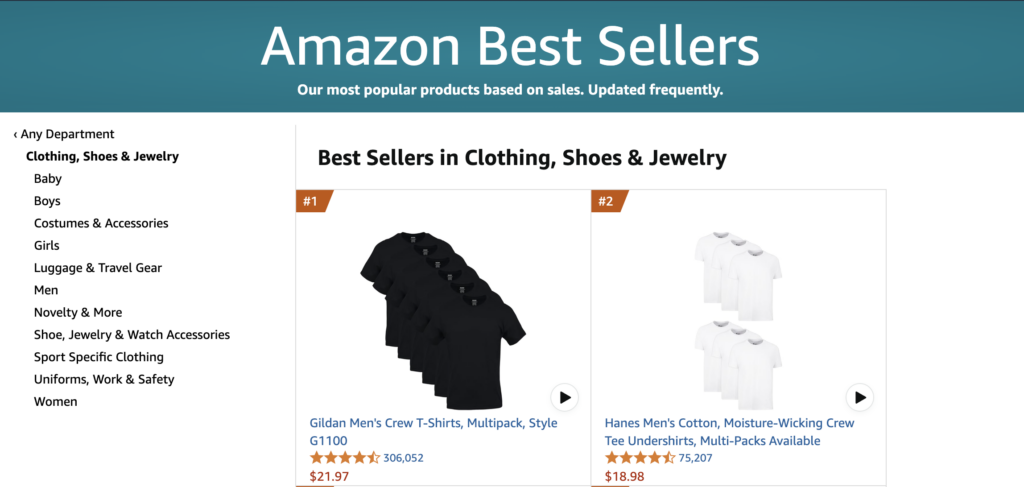
How to Scrape Amazon Best Sellers: Gain a Competitive Edge with Data

40% of Amazon sellers make between $1,000 and $25,000 per month, while super sellers earn over $100,000 per month. The key difference? Targeting the best-selling items, which Amazon publicly shares on its “Best Seller” lists. These pages are a goldmine of information, revealing consumer trends, hot products, and market opportunities. Let’s dive into “how to scrape Amazon Best Sellers” and leverage this data for better decision-making.

What is the Amazon Best Seller Rank?

Amazon ranks its best-selling products on its Best Seller pages, known as the Amazon Best Sellers Rank (BSR). While Amazon does not disclose the exact formula for ranking, it is widely accepted that sales volume is the primary factor, with recent sales carrying more weight than older ones. The list updates hourly, ensuring the most up-to-date snapshot of consumer demand.

Amazon categorizes these rankings into over 30 main categories, each with multiple subcategories—totaling around 25,000 categories. The algorithm also includes predictive factors to analyze potential future sales. These lists provide valuable insights, such as:

  • Trending Products: Identify emerging trends before they peak.
  • Competitive Analysis: See what your competitors are selling and how they’re performing.
  • Market Research: Understand consumer preferences and demand shifts.
  • Product Development: Spot market gaps and discover potential new product opportunities.
Amazon Best Seller Rank

With about 25,000 categories and rankings that vary across Amazon’s 20+ domains (amazon.com, amazon.co.uk, amazon.ca, etc.), manually collecting this data is impractical. Additionally, since the rankings update hourly, staying on top of these trends requires automation—this is where scraping APIs come in.

Benefits of Scraping Amazon Best Sellers Pages

  • Efficiency: Automate the extraction of large datasets quickly.
  • Real-Time Data: Access up-to-the-minute information on rankings and sales.
  • Customizable Data: Extract specific details such as product titles, prices, reviews, and rankings.
  • Scalability: Monitor multiple categories and products simultaneously.
  • Data-Driven Decisions: Use the insights for market analysis, pricing strategies, and competitive positioning.

What is an Amazon Best Sellers Scraper?

An Amazon Best Sellers Scraper  is a tool or script designed to automatically extract data from Amazon’s Best Sellers pages. These scrapers can be custom-built or utilize pre-built APIs, like Traject Data’s Amazon Rainforest API, to streamline the process.

The Legality and Challenges of Scraping Amazon

Now, let’s address the elephant in the room: is it legal to scrape Amazon? The answer is nuanced.

  • However, the legality of web scraping is a complex legal area and depends on how the extracted data is used.
  • Amazon employs various anti-scraping measures to detect and block automated scraping activities.

How Does Amazon Prevent Scraping?

Amazon implements several techniques to block scraping, including:

  • IP Address Blocking: Blocking IPs that send too many requests.
  • CAPTCHAs: Requiring users to verify they are human.
  • Rate Limiting: Restricting the number of requests per IP address.
  • User-Agent Analysis: Identifying bots through user-agent strings.
  • Honeypot Traps: Inserting hidden elements that only bots can see.

Due to these challenges, maintaining a manual scraping script is difficult and costly.

How to Scrape Amazon Best Sellers Effectively and Responsibly

Okay, so how do you actually scrape Amazon Best Sellers while minimizing the risks? 

Use a Reliable API

For a seamless and ethical approach, consider using a dedicated API like Traject Data’s Amazon Rainforest API. APIs handle the complexities of scraping, ensuring you get accurate data without triggering Amazon’s defenses.

  1. Sign up for a free API key at TrajectData.com.
  2. Visit Traject Data’s documentation for integration details.
  3. Watch a getting started video to learn how to use the API efficiently.
  4. Leverage the Rainforest API Bestsellers Endpoint, type=bestsellers 

When making a request with type=bestsellers, the Rainforest API returns Best Seller results from an Amazon Best Sellers page. The page can be specified using the category_id and amazon_domain parameters (where category_id is returned from the Categories API) or by using the url parameter.

The Rainforest API supports all types of Amazon Bestseller pages, including:

  • Bestsellers
  • New Releases
  • Movers & Shakers
  • Most Wished For
  • Gift Ideas

Leveraging the Traject Data Amazon Rainforest API

The Traject Data Amazon Rainforest API simplifies the process of scraping Amazon Best Sellers. 

  • Easy Integration: Easily integrate with your BI tool of choice. Data is delivered how and when you need it.
  • Comprehensive Documentation & Support: Well-documented endpoints and libraries for various programming languages.
  • Structured Data: Clean, JSON-formatted results, parsed and ready for analysis.
  • Comprehensive Data: Retrieve rankings, prices, reviews, and more.
  • Bestsellers Endpoint: Fetch Best Seller lists from any Amazon category.

Unlocking Insights with Amazon Best Seller Data

“How to scrape Amazon Best Sellers” is a question many data-driven businesses and researchers ask. By understanding the benefits, challenges, and best practices, you can unlock valuable insights hidden within Amazon’s Best Sellers pages. With the right approach—leveraging a robust API like Traject Data’s Amazon Rainforest API—you can harness real-time eCommerce intelligence without the headaches of manual scraping.

Ready to See What Traject Data Can Help You Do?


We’re your premier partner in web scraping for SERP data. Get started with one of our APIs for free and see the data possibilities that you can start to collect.

Unlock the Power of Search Data: Your Guide to SERP Scraper APIs

Ever wondered how businesses effortlessly gather all that search engine data? Well, a big part of that comes down to SERP scraper APIs. If you’re looking to dive into the world of data-driven decision-making, understanding how to use these APIs is a great starting point.

In this blog post, we’ll break down how to get started with SERP scraper APIs. We’ll cover everything from the basics to practical steps, empowering you to harness the power of search engine results page (SERP) data.

What is a SERP Scraper API?

Before we get into the “how-to,” let’s define our terms. A SERP scraper API is a tool that allows you to automatically extract data from search engine results pages.

SERP: The Search Engine Results Page, which is the page displayed by a search engine (like Google, Bing, etc.) in response to a user’s search query.

Whenever you search for something on Google, Bing, or any other search engine, you get a page full of results. This page contains a treasure trove of information, including:

  • Organic search results
  • Paid advertisements
  • Featured snippets
  • Local packs
  • And much more

A SERP scraper API is designed to grab this data and deliver it to you in a structured, easy-to-use format (like JSON). This automation is a game-changer because it eliminates the need for manual data collection, saving you time and resources.

Why Use a SERP Scraper API?

You might be wondering, “Why should I bother with a SERP scraper API?” Here are a few compelling reasons:

  • SEO Analysis: Track keyword rankings, monitor competitor strategies, and identify opportunities to improve your search engine optimization efforts.
  • Competitor Analysis: Keep an eye on your competitors’ online presence, ads, pricing, inventory, and marketing tactics.
  • Omnichannel eCommerce Monitoring: Collect data from multiple sources to build comprehensive databases and reports across all channels.
  • Pricing Strategies: Make informed decisions based on real-time data and gain a competitive edge.
  • Brand Protection: Identify unauthorized use of your brand name or logo, allowing you to take swift action against infringement.
  • Review Monitoring: Gather reviews from various platforms to understand customer sentiment, identify areas for improvement, and manage your online reputation.

Are SERP Scraping APIs legal?

Scraping publicly available data is legal. However, users must comply with a website’s terms of service or risk being blocked. Scraper APIs must follow these guidelines:

  • Scrape Only Publicly Available Data
  • Respect a Site’s Terms of Service
  • Ensure Compliance with Data Privacy Laws

How to Get Started with SERP Scraper APIs

Let’s get to the heart of the matter: how to get started with SERP scraper APIs. Here’s a step-by-step guide to help you navigate this process:

1. Choose the Right SERP Scraper API Provider

The first and most crucial step is selecting a reliable SERP scraper API provider. With so many options available, it’s essential to choose one that meets your specific needs. Here are some factors to consider:

  • Data Accuracy and Reliability: Ensure the provider delivers accurate and up-to-date data.
  • Coverage: Check if the API supports the search engines and locations you need.
  • Scalability: Consider whether the API can handle your current and future data needs.
  • Ease of Use: Look for a provider with clear documentation and a user-friendly interface.
  • Pricing: Evaluate the pricing structure and choose a plan that fits your budget. Many SERP providers also provide a free trial.
  • Customer Support: Good customer support is essential in case you run into any issues.
  • Integration Abilities: Whether you’re integrating the SERP API into an existing tool or analytics platform, seamless integration is vital. Evaluate the SERP API vendor’s batch automation and delivery options. Can the API provider deliver the required data to your specified destination frequently enough to keep you updated on search results?
  • Resilience and Reliability: As search engines make frequent updates, Google’s recent updates caused major outages for SERP providers. Choose a platform designed for adaptability to reduce downtime.

2. Sign Up and Get Your API Key

Once you’ve chosen a provider, the next step is to sign up for an account. Most providers offer free trials or starter plans that allow you to test their services before committing to a paid subscription.

After signing up, you’ll typically receive an API key. This unique key is your credential for accessing the API. Treat it like a password and keep it secure.

3. Read the Documentation

Before you start making API requests, it’s crucial to familiarize yourself with the provider’s documentation. The documentation will provide you with essential information, such as:

  • API endpoints
  • Request parameters
  • Authentication methods
  • Response formats
  • Error codes
  • Usage limits

4. Make Your First API Request

Now that you have your API key and understand the documentation, it’s time to make your first API request. The specific request will depend on the provider and the type of data you want to extract.

Here’s a general example of how an API request might look (using a Traject Data’s SerpWOW API):

GET /search

Performing a search is as simple as making a GET HTTP request to the SerpWow /search endpoint. The only required parameters are:

  • api_key – Sign up for free to get an API key.
  • q – Your search query.

For example, to search for the phrase pizza, the SerpWow search request would be:

https://api.serpwow.com/search?api_key=demo&q=pizza

To view SerpWow JSON results clearly in your browser, we recommend these extensions for Chrome and Firefox.

For more documentation, visit: docs.trajectdata.com

7. Store and Analyze the Data

Once you’ve extracted the data, you’ll likely want to store it in a database or file for further analysis. You can then use various tools and techniques to gain insights from the data, such as:

  • Spreadsheets (e.g., Google Sheets, Microsoft Excel)
  • Databases (e.g., MySQL, PostgreSQL)
  • Data visualization tools (e.g., Tableau, Power BI)

Benefits of Using Traject Data’s SERP API:

  • Comprehensive Coverage: Traject Data collects data across all major search engines, Google, Bing, Amazon, Walmart, and more.
  • User-Friendly API: Easily integrate SERP scraping into your existing marketing tools.
  • Built for the Future: At Traject Data, we’ve designed our scraping solutions with adaptability in mind, enabling us to respond quickly to industry shifts like Google’s latest updates.
  • Client Success Stories: We’ve helped numerous businesses navigate these challenges and come out stronger on the other side.

If you’re ready to gain a competitive edge with real-time insights, explore Traject Data’s APIs today and start optimizing your SEO strategy.

Ready to See What Traject Data Can Help You Do?


We’re your premier partner in web scraping for SERP data. Get started with one of our APIs for free and see the data possibilities that you can start to collect.

Traject Data is Your Premier Partner in Web Scraping


Join thousands of satisfied users worldwide who trust Traject Data for all their eCommerce and SERP data needs. Whether you are a small business or a global enterprise, our entire team is committed to helping you achieve your goals and stay ahead in today's dynamic digital landscape. Unlock your organization's full potential with Traject Data. Get started today.

Get started today